The Build Candidate Recommender helps engineering teams identify the strongest backlog items to consider for the next sprint.
It evaluates aged backlog items across age, priority, readiness, and dependency pressure and produces a ranked list of build candidates. It also highlights high-value items that are blocked only because the required definition or specification is missing.
The agent is designed for Engineering Managers and Engineering Leads who want to make sprint planning more evidence-driven instead of relying only on backlog age or priority.
What does the Build Candidate Recommender do?
As backlogs grow, valuable work can remain deferred across multiple sprints even when it is ready to be built. The Build Candidate Recommender evaluates aged backlog items and determines which ones deserve attention during the next planning cycle.
The agent automatically:
Identifies backlog items that have remained outside an active sprint beyond the configured age threshold.
Filters items according to configured work-item types and labels.
Determines whether each item has a resolvable specification.
Evaluates dependency pressure around each item.
Considers the item's age, priority, readiness, and dependency pressure together.
Ranks the strongest build candidates for the next sprint.
Identifies high-value items that are blocked only by missing definition.
Generates a report explaining why now for each recommended candidate.
Sends the report by email when recipients are configured.
In simple terms: Build Candidate Recommender helps engineering teams decide what aged backlog work is most worth pulling into the next sprint.
Before you start
For the agent to produce meaningful recommendations, the workspace should have:
A connected planning tool such as Jira Software or ADO Boards.
Backlog work items already ingested into Cubyts.
Specification or requirement information available for the work items.
Relationships between stories, specifications, and other relevant artefacts available in Cubyts.
Appropriate workspace members configured as the audience.
Email recipients configured if email delivery is required.
The agent works with information already available in Cubyts. It does not directly open external document repositories during the recommendation run.
Configure Build Candidate Recommender
To configure the agent, open:
Settings → Agents → Build Candidate Recommender
The configuration consists of three sections:
Run Configurations
Audience
Integrations
The agent can be enabled or disabled using the toggle in the top-right corner.
The agent is intended for Engineering Managers and Engineering Leads.
1. Run Configurations
The Run Configurations section controls when the agent runs and how backlog items are evaluated.
Scheduler
Use the Scheduler toggle to enable or disable automatic execution of the agent.
When enabled, you can select the required run frequency:
Daily
Weekly
Monthly
For a weekly schedule, select the day on which the audit should run.
For example:
Weekly → Wednesday
The agent runs at midnight for the configured schedule.
Planning lead time
Planning lead time (days) determines how close to the next sprint's planning date a scheduled run is allowed to execute.
For example, if the planning lead time is configured as 30 days, a scheduled run can execute when the next sprint planning date falls within that configured window.
The configuration shown in the supplied screen uses 30 days as the planning lead time.
Scheduled runs
For scheduled executions, Cubyts determines the upcoming sprint's planning date and checks whether the run falls within the configured planning lead-time window.
If a scheduled run is outside that window, the agent skips the run rather than generating a recommendation too early.
A manual Run now execution bypasses this planning-window restriction.
Backlog Configuration
The following configuration determines which backlog items are considered.
Backlog age threshold
Backlog age threshold defines how old a backlog item must be before it becomes eligible for evaluation. Items older than the configured threshold and not already in an active sprint are considered for recommendation.
For example, a value of 1 day means backlog items older than one day can be considered. The threshold is intentionally configurable because backlog cadence varies between teams.
The backlog age threshold does not have a universal default. It should be configured according to the team's planning and delivery cadence.
Candidates to surface
Candidates to surface configuration controls the maximum number of ranked candidates included in the report. The default is 8.
For example, if 20 backlog items qualify for evaluation, the report can surface only the top 8 candidates.
Qualifying work item types
Use Qualifying work item types to define which types of backlog items are eligible for recommendation.
For example: Story, Feature, Task
Only work items matching the configured types are eligible for recommendation.
Skip work item types
Use Skip work item types to explicitly exclude work items from consideration.
For example: Sub-task
Items matching a skipped type are excluded regardless of their age, priority, or other signals.
Force-include labels
Force-include labels configuration allows specific labels to override the normal work-item filtering rules.
For example: build-ready
Backlog items carrying a configured force-include label are included regardless of their normal type eligibility. Leave this field empty to disable the behavior.
Force-skip labels
Force-skip labels configuration allows specific labels to be excluded from consideration.
For example: wont-build
Backlog items carrying a configured force-skip label are always excluded. Leave this field empty to disable the behavior.
Spec locations
Spec locations configuration defines the locations from which the agent attempts to extract the specification governing a backlog item. The following locations are supported:
Attached link
Story description
Linked story
Parent epic
The readiness decision is based on whether a governing specification can be resolved; it does not currently represent a full assessment of specification quality.
2. Audience
The Audience section determines who receives the results of the agent.
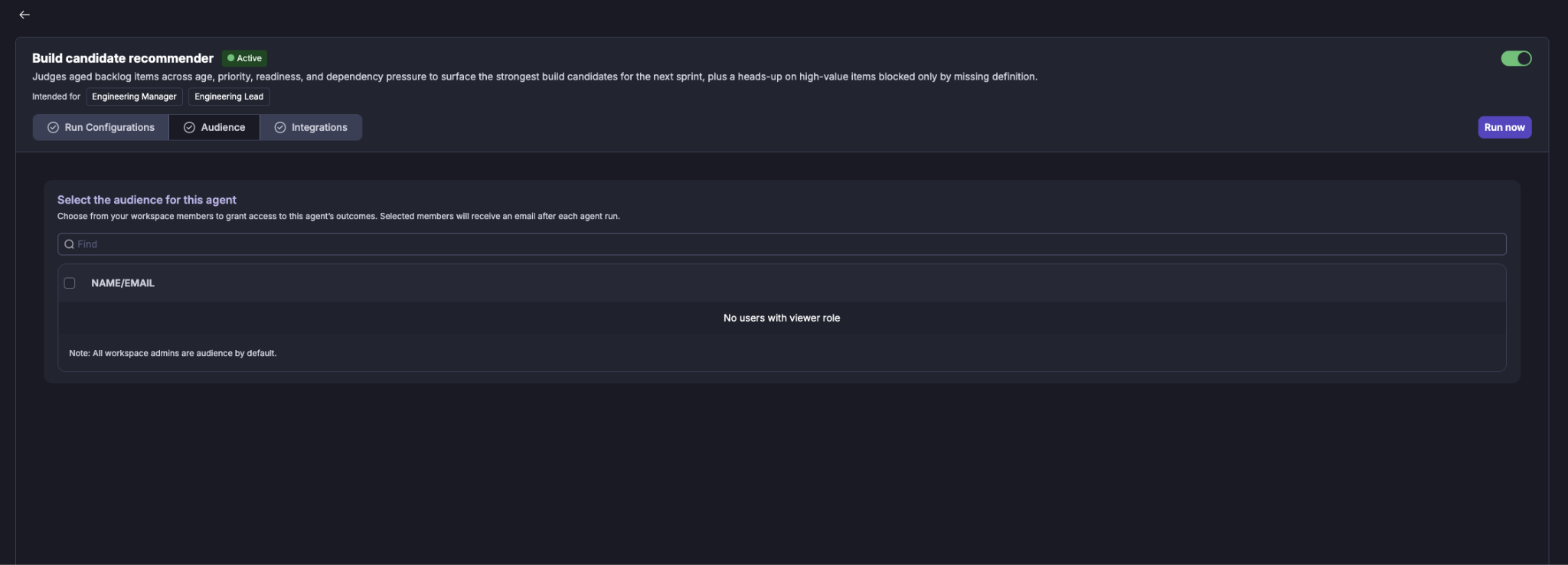
Select the workspace members (Viewers) who should have access to the agent's outcomes. Selected members receive an email after each agent run when email delivery is configured.
Selecting users
Use the Find field to search for a workspace member by name or email. Select the required users using the checkbox next to their name.
Workspace administrators are included as audience members by default.
If there are no users with the required viewer role, the audience list will indicate that no eligible users are available.
3. Integrations
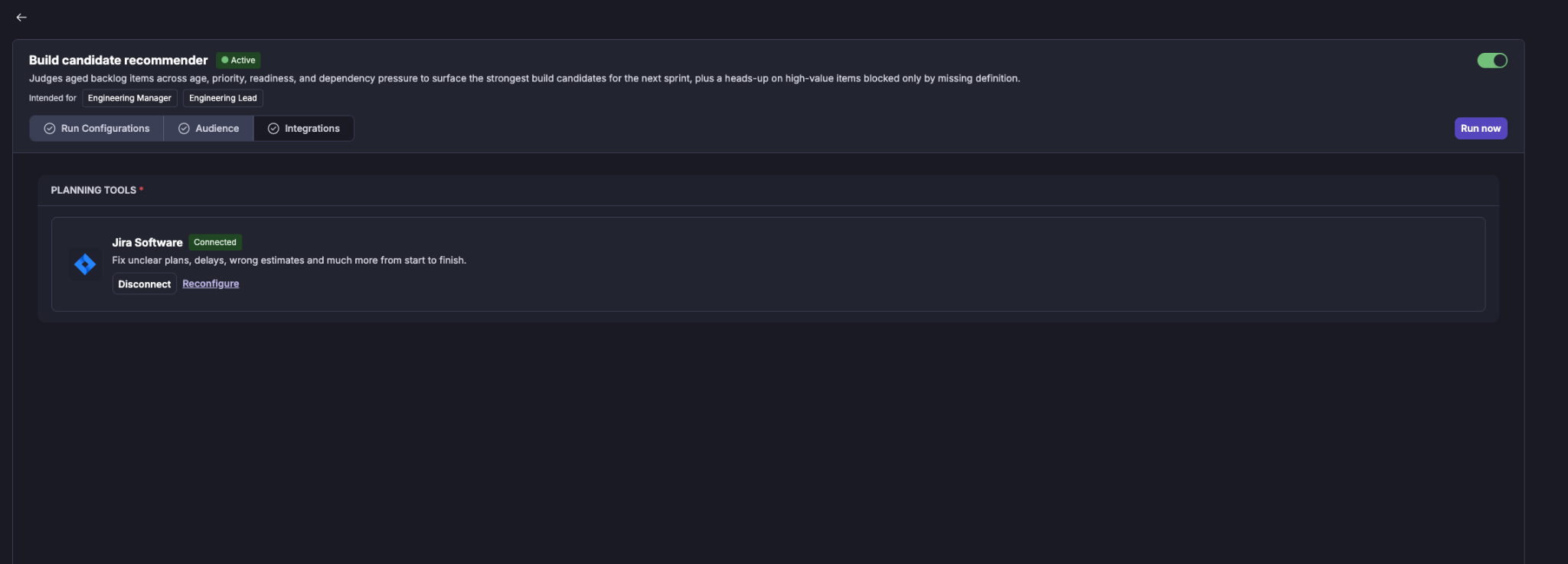
The Integrations section shows the tools required by the agent. The integrations are grouped by purpose.
Planning Tools
For example: Jira Software
The planning integration provides the backlog and planning context required to identify aged work items and determine the next sprint planning date.
A connected integration is shown with a Connected status.
You can:
Disconnect the integration.
Reconfigure the integration.
Running the Build Candidate Recommender
The agent can be run in two ways:
Scheduled run
When the Scheduler is enabled, the agent runs automatically according to the configured cadence. Scheduled runs are subject to the planning lead-time window.
This makes the recommender useful as part of the regular sprint planning process.
Manual run
A user can initiate an immediate run using Run now.
Manual execution does not require the run to be within the configured planning lead-time window. When Run now is selected, Cubyts displays a confirmation dialog before starting the run.
The supplied example shows:
Confirm Run
This will run the agent now. Based on recent runs, expect it to cost around $0.136.
The user can either Cancel or Continue. The displayed cost is an estimate based on recent runs and is shown before execution.
What happens during a run?
Once an audit starts, Cubyts follows a controlled sequence.
Step 1: Resolve planning context
The agent determines:
Agent configuration
Connected planning integration
Next sprint planning date
Planning lead-time window
Applicable backlog configuration
For scheduled runs, the agent verifies that the current date falls within the configured planning window.
Step 2: Identify aged backlog items
The agent identifies backlog items that:
Are outside an active sprint.
Are older than the configured backlog age threshold.
Match the configured work-item type rules.
Are not excluded by configured labels.
The resulting set forms the pool of items evaluated by the recommender.
Step 3: Determine readiness
For each eligible backlog item, the agent checks whether a governing specification can be resolved from the configured specification locations.
The item is classified as either:
Build-ready
A specification can be resolved from the available information.
Needs definition
A governing specification cannot be resolved. A needs_definition item is not silently treated as build-ready. A high-value item without a resolvable specification is instead considered for the Blocked Only By Definition section of the report.
Step 4: Evaluate dependency pressure
The agent evaluates dependency information associated with each backlog item.
Dependency pressure can include:
Whether the item is blocked.
Whether it has recently become unblocked.
Whether other items are waiting on it.
The number of dependent items waiting.
This signal helps distinguish an old backlog item from an old backlog item whose completion could unblock other work.
Step 5: Evaluate the four judgment axes
The Build Candidate Recommender combines four signals:
1. Age: How long the item has remained in the backlog.
2. Priority: The item's current priority.
3. Readiness: Whether the item has a resolvable governing specification.
4. Dependency pressure Whether the item is blocked, newly unblocked, or has dependent work waiting.
The agent does not simply sort by age or priority. Instead, the LLM evaluates the four signals together to determine which items represent the strongest build candidates. This four-axis synthesis is the core decision-making capability of the agent.
Important readiness rule
An item without a resolvable specification is not recommended as a build candidate, even if it is old or high priority.
Instead, it can be surfaced as:
Blocked Only By Definition
This distinction helps the engineering team understand whether the next action should be to build the item or first obtain the missing definition.
Step 6: Rank the build candidates
The agent ranks the eligible build-ready items and selects the strongest candidates up to the configured Candidates to surface limit.
For each candidate, the report explains:
Work item
Age
Priority
Readiness
Dependency pressure
Why now
The Why now explanation is intended to make the recommendation actionable rather than presenting a simple ranked list.
For example, the supplied report includes recommendations such as an aged, build-ready story that is currently blocking another dependent item, making it a stronger candidate for the upcoming sprint.
Step 7: Generate the report
The final recommendation report is stored in Cubyts.
When recipients are configured, Cubyts also generates an email version of the report and sends it to the configured audience.
The report provides both the recommendations and the context needed to interpret them.
Understanding the Build Candidate Report
The report provides a consolidated view of the backlog items evaluated for the upcoming planning cycle.

The supplied report example shows:
Next Planning: Aug 3, 2026
Aged items considered: 5
Build candidates surfaced: 5
Build Candidates (ranked)
The report presents the recommended items in ranked order.
For each candidate, the report provides:
Work-item key
Work-item title
Age
Priority
Readiness
Dependency pressure
Why the item should be considered now
For example, the supplied report identifies UDY-72 as the first-ranked candidate because it was:
46 days old
Medium priority
Build-ready
Blocking at least one dependent item
The report explains that the combination of age, readiness, and dependency leverage makes it a strong candidate for the next sprint.
Coverage Notes
The report includes Coverage Notes to make the limitations of the recommendation visible.
The supplied example highlights several important considerations:
Priority may be uniform across the evaluated items, making priority a weaker differentiator.
Dependency pressure is derived from captured issue links; dependencies that have not been recorded cannot be reflected.
Items with unresolvable specifications are treated separately rather than silently being classified as build-ready.
Very old items may be surfaced as decision-forcing candidates because of how long they have remained deferred.
This section is important because the recommendation should be interpreted in the context of the quality and completeness of the underlying backlog data.
Understanding the recommendation
The Build Candidate Recommender is intended to support a planning decision, not replace the Engineering Lead's judgment.
A candidate may rank highly because of a combination such as:
High age + build-ready + dependency leverage
while another item may rank highly because it has remained deferred for a long period despite having no dependency blockers.
The report therefore explains why now instead of presenting the ranking as an absolute priority order.
Skip conditions
The agent can skip a run in the following situations:
A run with zero build candidates but one or more definition-flagged items is not considered a skip. The report can still provide useful definition follow-ups.
Important boundaries
The Build Candidate Recommender is an advisory and reporting agent.
It does not:
Modify Jira or ADO work items.
Modify specifications.
Modify code.
Change priorities.
Add items to a sprint.
Resolve dependencies.
Automatically change backlog decisions.
The engineering team remains responsible for deciding which recommendations should actually be taken into the next sprint.
Summary
Build Candidate Recommender gives Engineering Managers and Engineering Leads an evidence-based view of which aged backlog items deserve consideration for the next sprint.
It combines:
Age
Priority
Readiness
Dependency pressure
to produce a ranked list of build candidates, while separately surfacing high-value items that require additional definition.
The result is not simply an older-items report. It is a decision-support report that explains which backlog items are worth acting on now, why they matter, and where additional definition is required before they can be built.
Was this article helpful?
That’s Great!
Thank you for your feedback
Sorry! We couldn't be helpful
Thank you for your feedback
Feedback sent
We appreciate your effort and will try to fix the article