The ADR Drift Auditor helps engineering teams identify when code changes drift from the architectural decisions documented for their applications.
It reviews merged pull requests against applicable Architecture Decision Records (ADRs) and identifies potential deviations, along with the affected pull requests, developers, stories, and architectural decisions.
The agent is designed for Engineering Leads and Engineering Managers who want continuous visibility into architectural compliance without manually reviewing every pull request and ADR.
What does the ADR Drift Auditor do?
Teams document important architectural decisions in ADRs—for example:
All database access must go through repository classes.
Background processing must use the approved messaging framework.
Services must not make direct calls to a particular external system.
Authentication must use the approved security mechanism.
Over time, code changes can unintentionally move away from these decisions.
ADR Drift Auditor automatically:
Identifies merged pull requests within a selected time window.
Determines which architectural decisions apply to those changes.
Collects available code-change evidence.
Evaluates whether the changes violate the applicable ADRs.
Performs a second, adversarial review of potential violations.
Groups and prioritizes confirmed drift.
Generates a report and, where configured, sends an email digest to the selected audience.
In simple terms: ADR Drift Auditor checks whether what your team shipped is still aligned with the architectural decisions your team has documented.
Before you start
For the agent to produce meaningful results, the workspace should have:
ADRs ingested into Cubyts from supported document sources.
A connected planning tool such as Jira.
A connected code repository such as GitHub.
Code areas and document relationships available in Cubyts.
Appropriate workspace members configured as the audience.
Email recipients configured if email delivery is required.
The agent works with information already ingested into Cubyts. It does not directly open Confluence, Google Drive, or OneDrive during the audit.
Configure ADR Drift Auditor
To configure the agent, open:
Settings → Agents → ADR Drift Auditor
The configuration consists of three sections:
Run Configurations
Audience
Integrations
The agent can also be enabled or disabled using the toggle in the top-right corner.
The agent is intended for Engineering Lead users.
1. Run Configurations
The Run Configurations section controls when the agent runs.
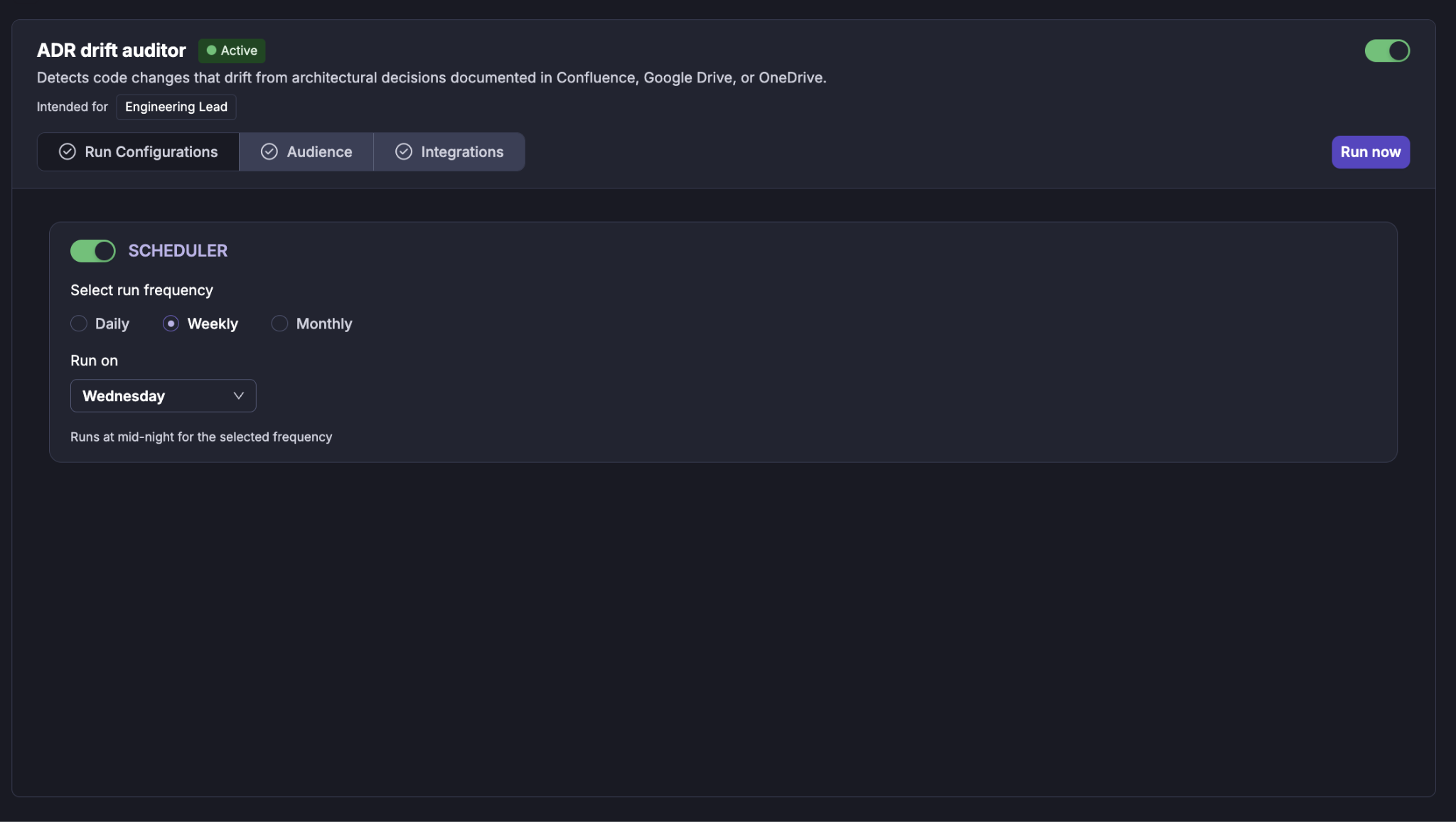
Scheduler
Use the Scheduler toggle to enable or disable automatic execution of the agent.
When enabled, you can select the required run frequency:
Daily
Weekly
Monthly
For a weekly schedule, select the day on which the audit should run.
For example:
Weekly → Wednesday
The agent runs at midnight for the configured schedule.
Scheduled audit window
For scheduled runs, Cubyts automatically determines the audit window.
The window normally starts from the previous scheduled run and ends at the current run.
For the first scheduled run, Cubyts uses a default recent window.
This means you do not need to manually specify a date range every time a scheduled audit runs.
2. Audience
The Audience section determines who receives the results of the agent.
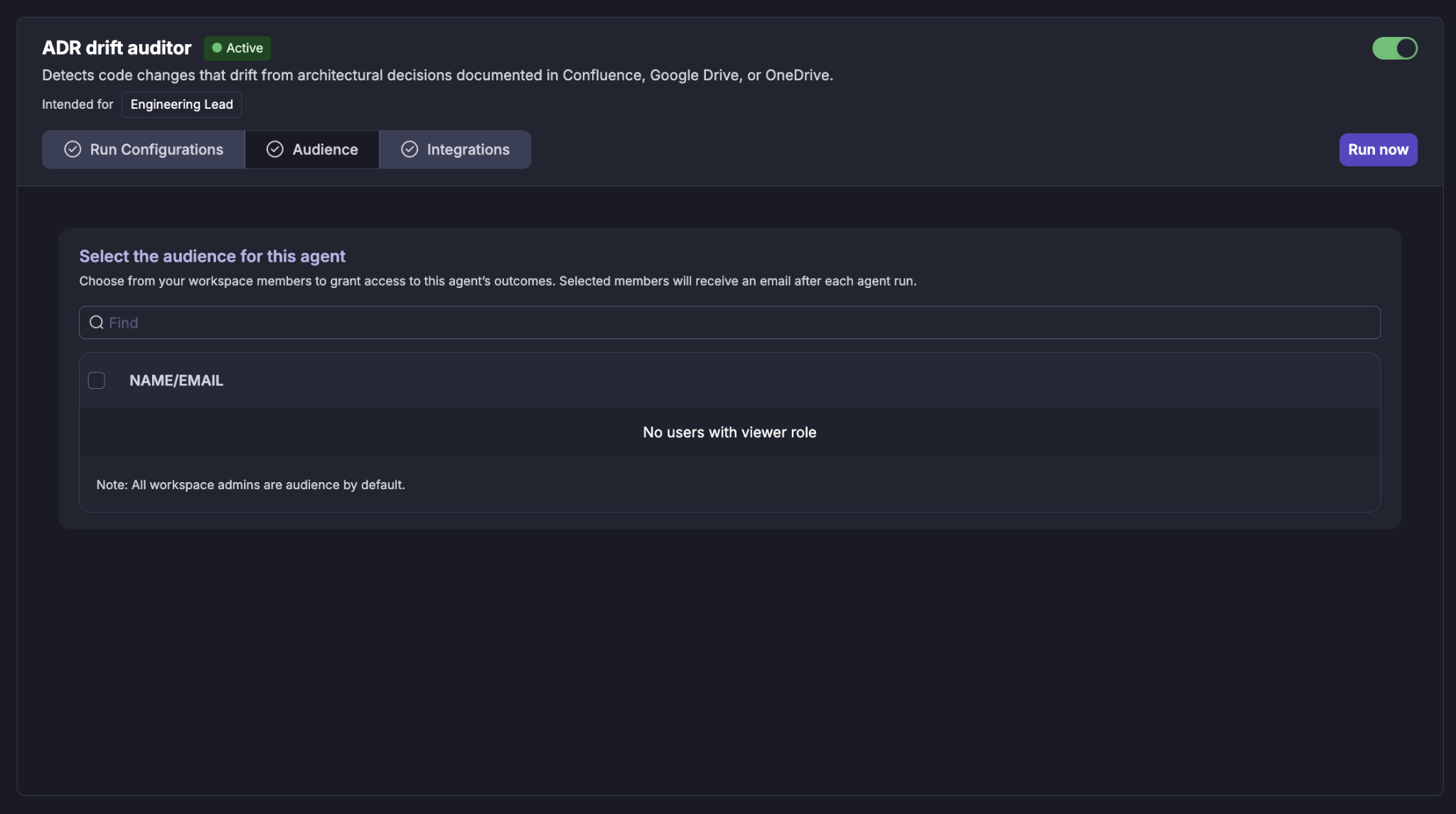
Select the workspace members (Viewers) who should have access to the agent's outcomes.
Selected members receive an email after each agent run when email delivery is configured.
Selecting users
Use the Find field to search for a workspace member by name or email. Select the required users using the checkbox next to their name.
Workspace administrators are included as audience members by default.
If there are no users with the required viewer role, the audience list will indicate that no eligible users are available.
3. Integrations
ADR Drift Auditor uses information from your connected engineering tools to establish the relationship between code changes and architectural decisions.
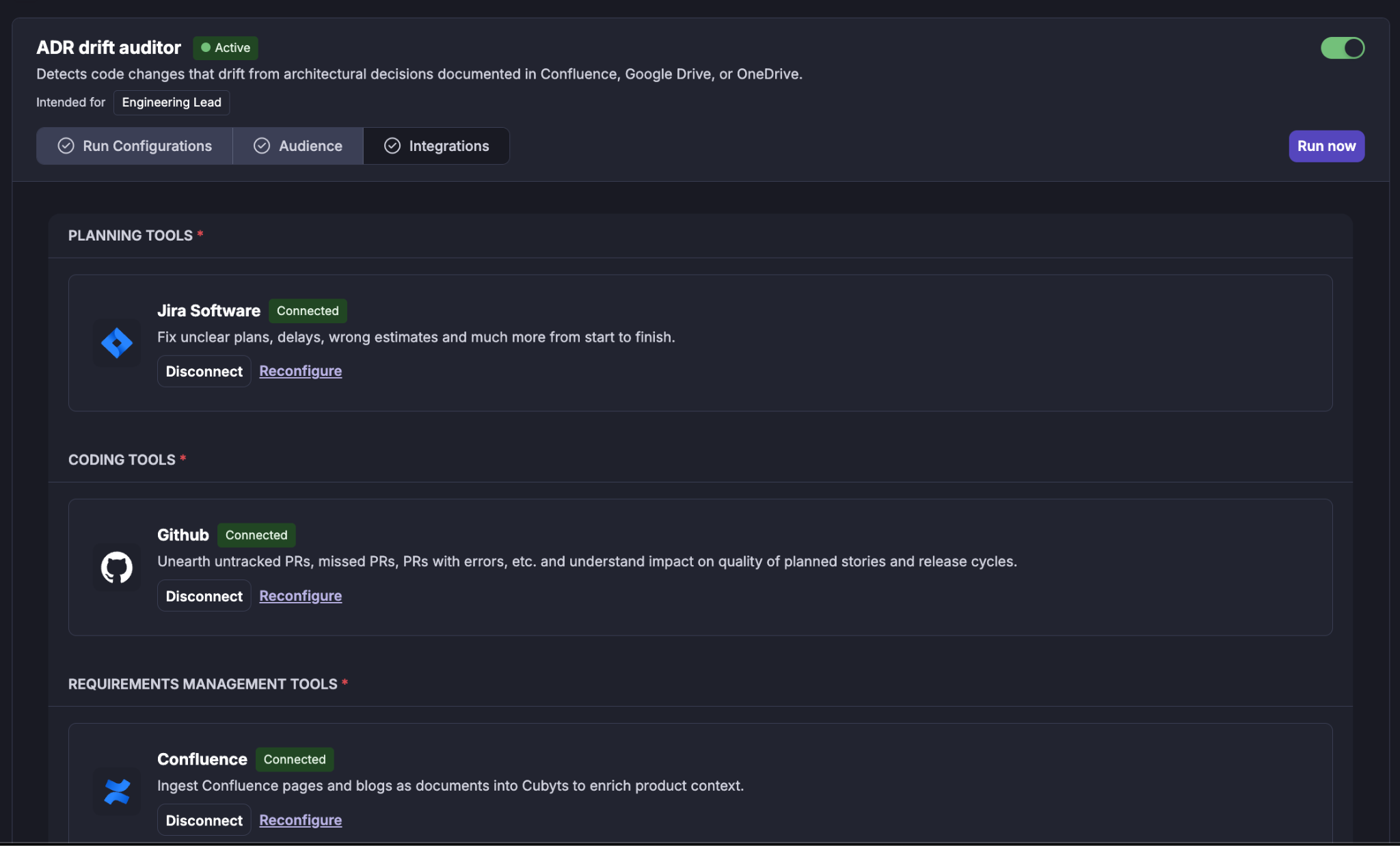
The Integrations section shows the tools required by the agent. The integrations are grouped by purpose.
Planning Tools
For example: Jira Software
Jira provides the planning context associated with the changes being reviewed, including stories and related work items.
A connected integration is displayed with a Connected status.
You can:
Disconnect the integration.
Reconfigure the integration.
Coding Tools
For example: GitHub
The coding integration provides the pull requests and code-change information used by the agent.
The agent uses merged pull requests as the primary source of changes for an audit.
Requirements Management Tools
For example: Confluence
Confluence provides documents that have been ingested into Cubyts and may contain architectural decisions.
The agent does not treat every document as an ADR. Cubyts identifies documents containing actual decision information and makes those available to the agent for evaluation.
Running an ADR Drift Audit
The agent can be run in two ways:
Manual run
A lead can initiate an audit for a specific time window.
The window can be based on a preset such as:
Last 30 days
Last 3 months
Last quarter
or a custom start and end date.
Scheduled run
When the Scheduler is enabled, the agent automatically runs according to the configured cadence.
This is useful for making ADR compliance reviews part of the regular engineering governance process.
What happens during an audit?
Once an audit starts, Cubyts follows a controlled sequence.
Step 1: Identify what was shipped
The agent identifies merged pull requests within the selected time window.
For each change, Cubyts determines available information such as:
Pull request
Author
Story
Changed files
Code areas
Merge date
Step 2: Identify applicable ADRs
Cubyts determines which architectural decisions are relevant to the changed code.
It uses relationships between:
Code areas
Stories
Documents
ADRs
Only documents containing an identifiable architectural decision are evaluated as ADRs. Documents that cannot be reliably identified as ADRs are surfaced as coverage gaps rather than being treated as architectural rules.
Step 3: Assemble the evidence
The agent builds candidate relationships between:
Code change ↔ Architectural decision
Available code-change evidence is collected for the changes being evaluated.
This allows the agent to evaluate multiple changes against the same architectural decision rather than treating every pull request as an isolated review.
Step 4: Evaluate drift
The AI evaluates whether the available change evidence violates the applicable architectural decision.
For each potential violation, it considers:
The ADR decision
The relevant change
The changed code or available evidence
The associated story and context
The confidence of the finding
Only findings above the configured confidence threshold are retained.
Step 5: Verify potential violations
Potential findings go through a second review.
The verification step asks whether the apparent violation could instead be:
An intentional architectural change
A legitimate exception
A requirement-driven change
A result of insufficient evidence
This additional review is intended to reduce false positives.
Step 6: Generate the report
The confirmed findings are grouped by ADR and ranked according to their severity and importance.
The report also identifies patterns in the observed drift.
Step 7: Deliver the results
The final report is stored in Cubyts.
If recipients are configured, an email digest is also sent to the selected audience.
Understanding the ADR Drift Report
The report provides a consolidated view of the architectural decisions evaluated during the selected period.
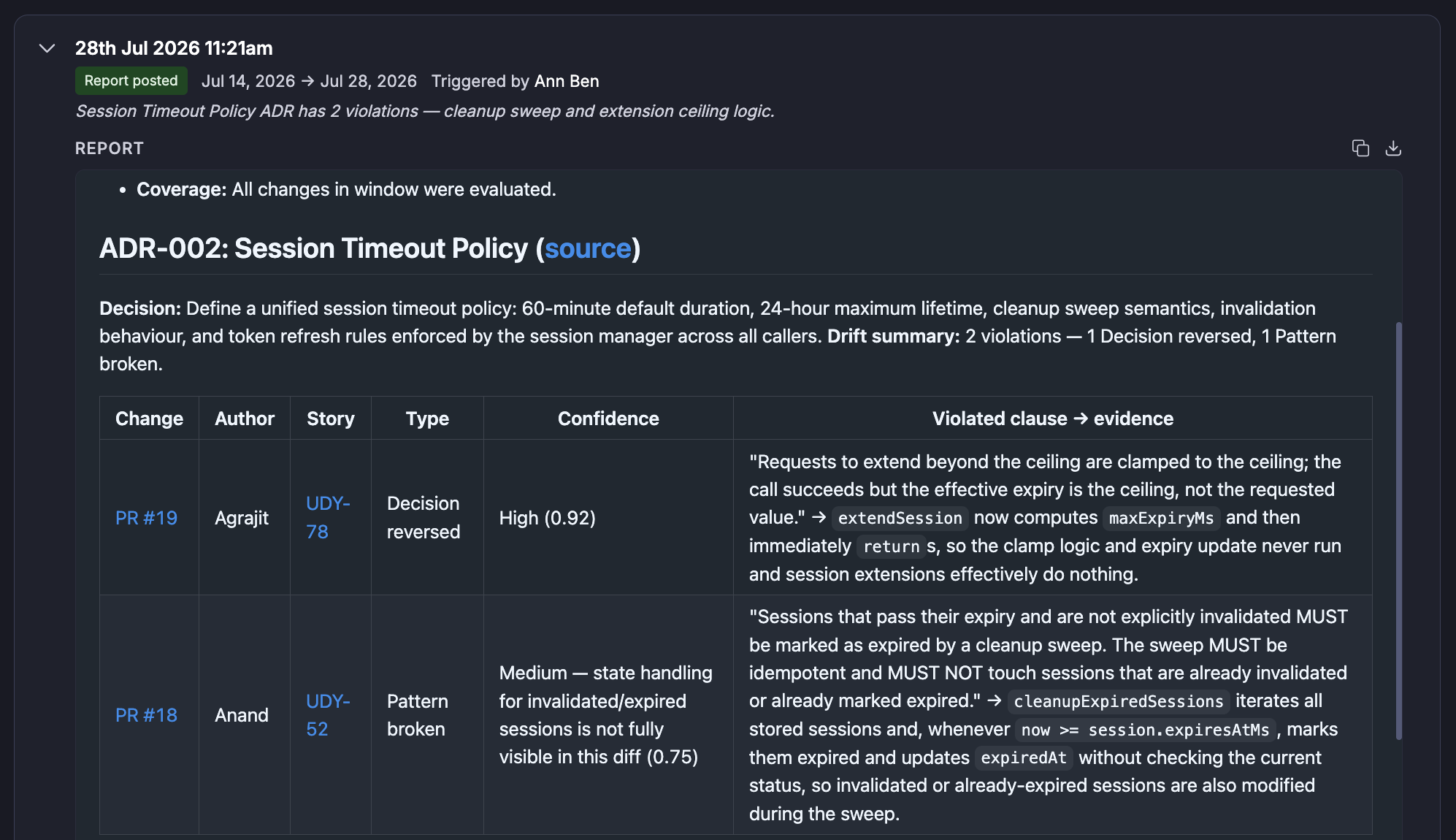

It includes:
Audit summary
The report identifies:
Audit window
Number of changes evaluated
Number of ADRs evaluated
Number of ADRs with detected drift
ADR-level findings
For each ADR where drift was identified, the report provides:
ADR title
Architectural decision
Source document
Relevant pull requests
Author
Associated story
Description of the potential violation
Confidence
Pattern signal
The report also distinguishes between findings and areas that could not be fully evaluated.
Understanding Pattern Signals
ADR Drift Auditor uses pattern signals to help an engineering lead understand whether a finding appears isolated or broader.
Isolated
A small number of violations are observed. This may indicate an individual deviation or an isolated implementation issue.
Concentrated
Multiple violations are associated with the same developer or small group. This may indicate that additional clarification or awareness of the architectural decision is required.
Systemic
The same architectural decision is being violated across multiple developers or changes. This can indicate that the decision may be misunderstood, difficult to implement, or no longer aligned with the team's current architecture.
Module-scoped
The violations are concentrated within a particular application or code area. This may indicate that the architectural decision does not fit that area cleanly.
Important: Pattern signals are observations, not recommendations. ADR Drift Auditor does not decide whether the code, ADR, or architecture should be changed. The engineering team makes that decision.
Coverage Gaps
A key principle of ADR Drift Auditor is that "not evaluated" is different from "clean."
If Cubyts cannot establish a reliable relationship between a change and an architectural decision, it does not invent a finding and does not silently classify the change as compliant.
Coverage gaps can occur when:
An ADR has not been ingested.
A document cannot be reliably identified as an ADR.
A code change has not yet been mapped to a code area.
Required planning or repository information is unavailable.
The available evidence is insufficient.
These gaps are surfaced in the report so that engineering teams understand the limits of the audit.
Important boundaries
ADR Drift Auditor currently evaluates merged pull requests.
It does not evaluate direct commits pushed to the main branch without a pull request.
The agent also does not modify:
Code
ADRs
Stories
Pull requests
It is an audit and reporting agent. The engineering team remains responsible for deciding whether an identified deviation should be corrected, accepted, or reflected in an updated architectural decision.
Summary
ADR Drift Auditor continuously checks shipped code against documented architectural decisions, identifies potential drift with evidence and patterns, and gives engineering leaders the visibility needed to decide what should change.
Was this article helpful?
That’s Great!
Thank you for your feedback
Sorry! We couldn't be helpful
Thank you for your feedback
Feedback sent
We appreciate your effort and will try to fix the article