The Customer Defect Ranker helps engineering teams identify the highest-impact customer issues to address within the engineering capacity reserved for defect fixing during a sprint.
It evaluates open customer issues across priority, age, customer-impact objectives, and estimated investigation effort, and produces a ranked list of defects that best fit the available engineering capacity.
The agent is designed for Scrum Masters, Engineering Managers, and Engineering Leads who want to make customer-defect triage more evidence-driven instead of relying only on ticket priority or age.
What does the Customer Defect Ranker do?
Customer issues can accumulate across support queues, making it difficult for engineering teams to determine which issues deserve attention in the next sprint.
The Customer Defect Ranker evaluates open customer issues and determines which ones represent the strongest candidates for engineering investigation within the configured defect capacity.
The agent automatically:
Identifies open customer issues from the connected customer feedback platform.
Normalises the issues across supported sources such as Zendesk, Freshdesk, Jira Service Management, and Jira Feedback.
Assigns a baseline effort estimate based on issue priority.
Scores issues using priority, age, and configured scoring objectives.
Identifies the strongest issues for further analysis.
Uses linked story and code context where available to refine effort estimates.
Selects the best-fit set of defects within the configured engineering capacity.
Identifies important issues that could not fit within the available capacity.
Generates a triage report explaining why the selected issues should be considered.
Sends the report to configured recipients when email delivery is enabled.
In simple terms: Customer Defect Ranker helps engineering teams decide which customer issues are most worth spending engineering capacity on now.
Before you start
For the agent to produce meaningful recommendations, the workspace should have:
A connected customer feedback or support integration.
Customer issues already ingested into Cubyts.
A configured engineering capacity or bug budget.
Appropriate scoring guidance when specific customer-impact objectives need to be considered.
Appropriate workspace members configured as the audience.
Email recipients configured if email delivery is required.
The agent works with information already available in Cubyts. It does not require a separate external-source configuration. The implementation automatically detects the available customer-support source from the workspace.
Configure Customer Defect Ranker
To configure the agent, open:
Settings → Agents → Customer Defect Ranker
The configuration consists of three sections:
Run Configurations
Audience
Integrations
The agent can be enabled or disabled using the toggle in the top-right corner.
The agent is intended for: Scrum Master, Engineering Manager, Engineering Lead
1. Run Configurations
The Run Configurations section controls when the agent runs and how backlog items are evaluated.
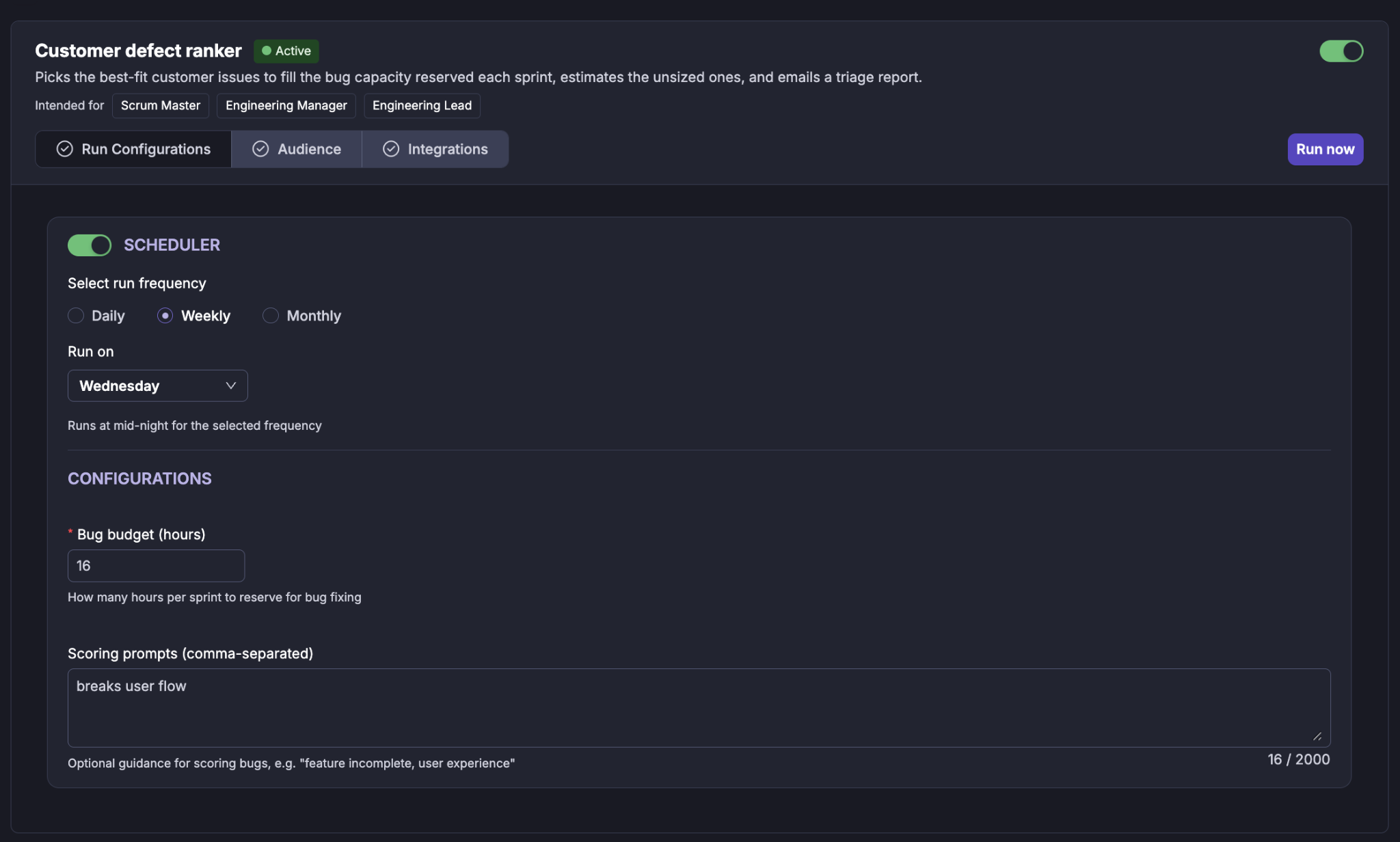
Scheduler
Use the Scheduler toggle to enable or disable automatic execution of the agent.
When enabled, you can select the required run frequency:
Daily
Weekly
Monthly
For a weekly schedule, select the day on which the audit should run.
For example:
Weekly → Wednesday
The agent runs at midnight for the configured schedule.
Bug budget (hours)
Bug budget (hours) defines how many engineering hours are available for customer-defect investigation during the run.
For example, if the bug budget is configured as 16 hours, the agent attempts to select the combination of customer issues that provides the best overall fit within those 16 hours.
The supplied configuration screen shows a bug budget of 16 hours.
The implementation supports a configurable range of 1–1000 hours, with a documented default of 40 hours.
Scoring prompts
Scoring prompts provide optional guidance for evaluating customer issues.
The prompts are entered as comma-separated values.
For example:
breaks user flow
Other examples can include:
data loss
authentication
payment failure
customer impact
These prompts help the agent understand what types of customer impact should receive additional consideration when ranking defects.
2. Audience
The Audience section determines who receives the results of the agent.
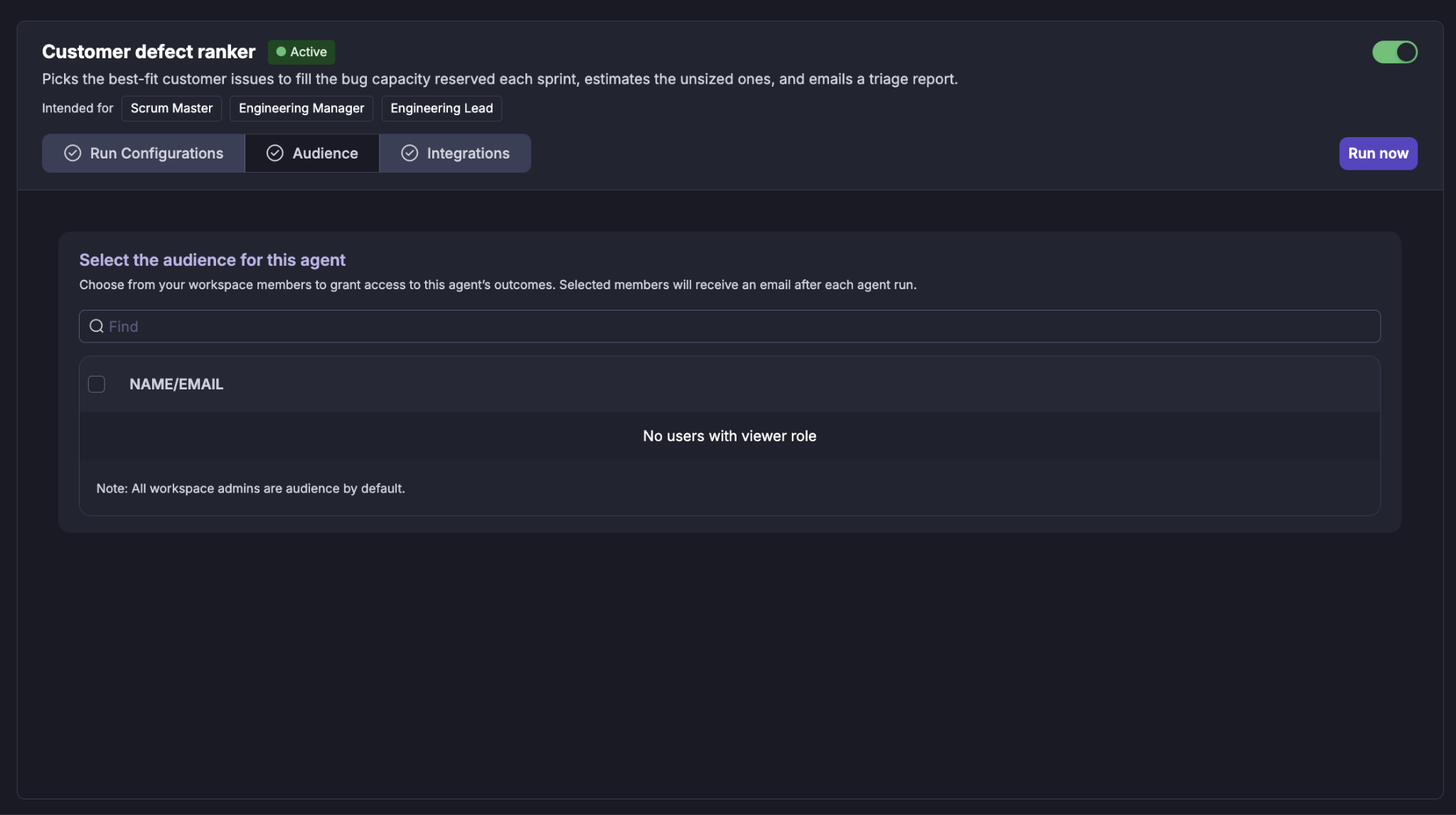
Select the workspace members (Viewers) who should have access to the agent's outcomes. Selected members receive an email after each agent run when email delivery is configured.
Selecting users
Use the Find field to search for a workspace member by name or email. Select the required users using the checkbox next to their name.
Workspace administrators are included as audience members by default.
If there are no users with the required viewer role, the audience list will indicate that no eligible users are available.
3. Integrations
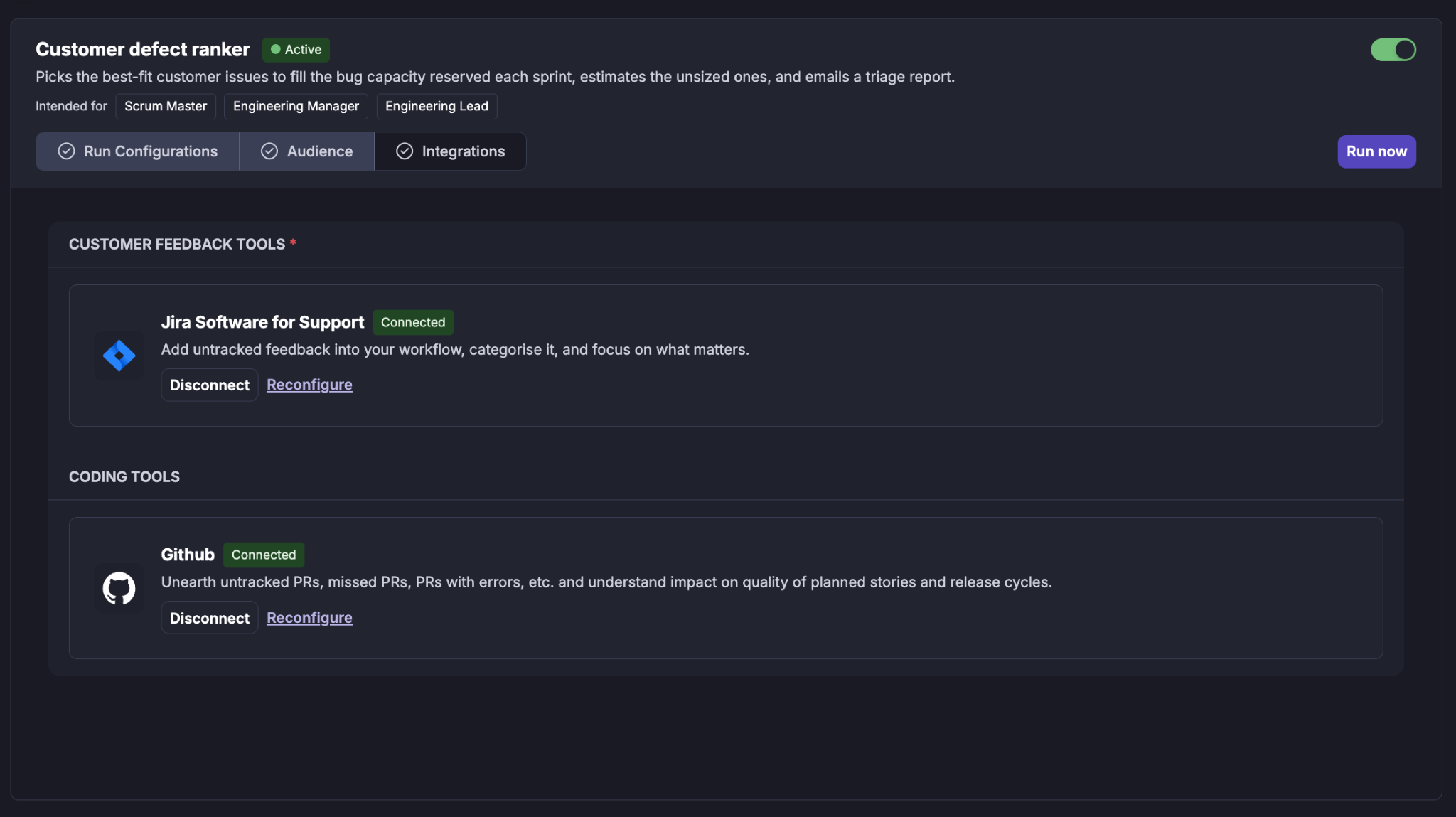
The Integrations section shows the tools required by the agent.
The integrations are grouped according to their purpose.
Customer Feedback Tools
The customer feedback integration provides the issues that the agent evaluates and ranks.
The integration can be: Disconnected, Reconfigured
Coding Tools
Coding tools code context when a customer issue can be associated with an internal story and corresponding code-area information.
This additional context can be used to refine the estimated engineering effort for selected customer issues.
The implementation does not require coding tools integration to be used for the baseline ranking. Code context is an optional refinement stage for the highest-scoring tickets.
Running Customer Defect Ranker
The agent can be run in two ways:
Scheduled run
When the Scheduler is enabled, the agent runs automatically according to the configured cadence.
The scheduled execution evaluates the current customer issue backlog and produces a capacity-aware recommendation.
Manual run
A user can initiate an immediate run using Run now.
When Run now is selected, Cubyts displays a confirmation dialog before starting the run. The confirmation dialog displays the estimated cost of the run based on recent executions (The supplied example shows an estimated cost of approximately $0.394).
The user can either: Cancel or Continue
The displayed cost is an estimate and is shown before execution.
What happens during a run?
Once a run starts, Cubyts follows a controlled sequence.
Step 1: Get prior runs
The agent checks previous customer-defect ranking runs.
This allows the agent to maintain run history and determine whether the customer issue snapshot has changed since the previous run.
Step 2: Identify customer issues
The agent identifies eligible open customer issues from the connected support platform.
Supported sources include:
Zendesk
Freshdesk
Jira Service Management
Jira Feedback
The source is automatically detected at runtime. No external-source field is required in the agent configuration.
Closed or resolved issues are excluded according to the status rules of the source.
For example:
Zendesk excludes closed and solved tickets.
Freshdesk excludes status 4 — Resolved and 5 — Closed.
Jira Service Management excludes issues whose status category is done.
Jira Feedback uses the same Jira status-category rule.
The resulting set forms the pool of customer issues evaluated by the ranker.
Step 3: Estimate baseline effort
Because customer-support tickets generally do not have story points or reliable engineering time estimates, the agent first assigns a baseline estimate based on priority.
The baseline is:
The baseline is intentionally simple and provides an initial estimate for every issue before deeper analysis is performed.
Step 4: Score the customer issues
The agent scores every eligible customer issue.
The scoring model combines three signals:
Priority
Age
Scoring prompt
The documented weighting is:
The overall score is calculated as:
Total Score = 0.5 × Priority Score + 0.2 × Age Score + 0.3 × Prompt Score
Step 5: Refine the estimates
The agent performs a deeper analysis for the highest-scoring customer issues. It attempts to identify a relationship between the external customer issue and an internal engineering story.
The lookup sequence is:
Find the customer issue.
Identify the best matching internal story.
Use the story ID to locate its code-area context.
Run the code-context analysis.
Refine the engineering effort estimate.
The linked story is recorded as part of the candidate's audit information.
If no suitable code context is found, the agent keeps the original priority-based estimate.
Step 6: Pick defects within the engineering budget
Once scoring and estimate refinement are complete, the agent determines which customer issues should actually be selected. The selection uses a deterministic knapsack algorithm. This means the agent attempts to maximise the value of the selected issues while staying within the configured bug budget.
For example:
Bug budget = 16 hours
The agent may select:
Defect A — 6 hours
Defect B — 6 hours
Total:
12h of 16h used
The remaining capacity is not automatically filled with a lower-value defect if doing so would produce a worse overall selection.
The picking step is deterministic, meaning the same input produces the same selection.
Step 7: Generate the report
The final triage report contains the selected customer issues and the reasoning behind the selection. When recipients are configured, Cubyts also generates and sends an email version of the report. The run outcome is recorded in the agent run history for auditability.
Understanding the Customer Defect Ranking Report
The report provides both the selected customer defects and the context required to understand why they were selected.
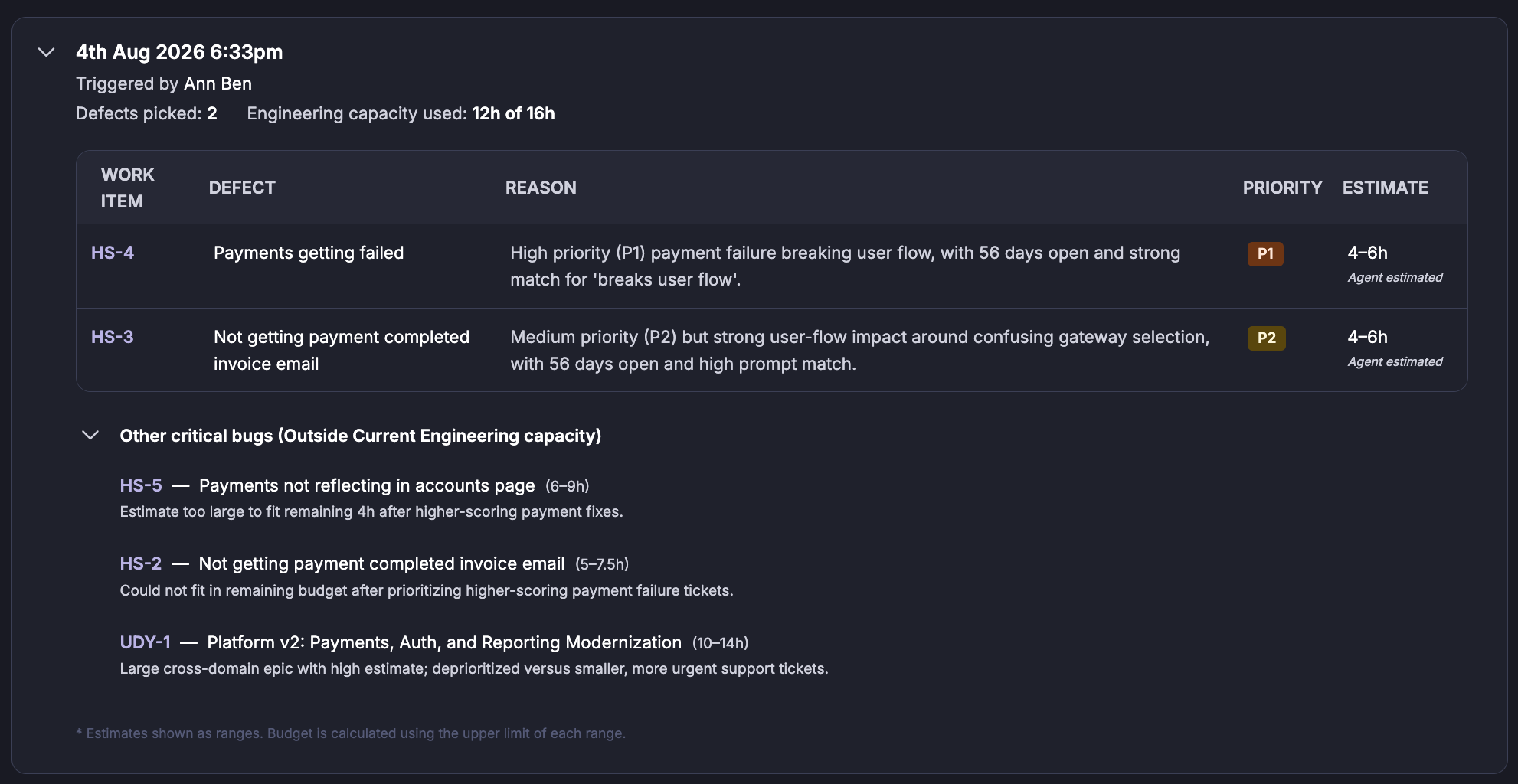
The supplied report example shows:
Defects picked: 2
Engineering capacity used: 12h of 16h
Selected defects
The selected defects are presented with information such as:
Work item
Defect
Reason
Priority
Estimate
For example, the supplied report shows:
HS-4 — Payments getting failed
with:
Priority: P1
Estimate: 4–6h
Reason: high-priority payment failure breaking the user flow, with the issue remaining open for an extended period and matching the configured scoring objective.
Another selected issue is:
HS-3 — Not getting payment completed invoice email
with:
Priority: P2
Estimate: 4–6h
Reason: strong user-flow impact and a high match to the configured scoring objective.
The report therefore does more than provide a ranking. It explains the reasoning behind each recommendation.
Other Critical Bugs
The report separately displays important defects that were outside the current engineering capacity.
For example, the supplied report identifies:
HS-5 — Payments not reflecting in accounts page
HS-2 — Not getting payment completed invoice email
UDY-1 — Platform v2: Payments, Auth, and Reporting Modernization
These issues remain visible so that engineering teams can understand what was not selected and why.
An issue may remain outside capacity because its estimated effort is too large to fit into the remaining budget after higher-value issues have been selected.
This allows the report to distinguish between: Selected for the current capacity and Important but outside the current capacity.
Understanding the recommendation
The Customer Defect Ranker is intended to support engineering triage decisions, not replace engineering judgement.
A customer issue may rank highly because of a combination such as:
High priority + long age + strong customer-impact match + manageable effort
Another issue may rank highly because it has a strong customer-impact signal even if its priority is lower.
The ranking should therefore be interpreted as a capacity-aware recommendation, rather than an absolute statement that one customer issue is always more important than another.
Skip conditions
The agent can skip a run in the following situations:
The agent can skip a run in the following situations:
Important boundaries
The Customer Defect Ranker is an advisory and reporting agent.
It does not:
Modify customer support tickets.
Write estimates back to the support system.
Modify code.
Change issue priorities.
Automatically resolve customer issues.
Automatically resolve dependencies.
Add issues to a sprint.
Automatically change engineering backlog decisions.
The engineering team remains responsible for deciding which recommendations should actually be taken into the sprint.
The agent is read-only with respect to the external support systems.
Summary
Customer Defect Ranker gives Scrum Masters, Engineering Managers, and Engineering Leads an evidence-based view of which customer issues deserve engineering attention within the available defect capacity.
It combines:
Priority
Age
Customer-impact scoring
Baseline effort
Code-context refinement where available
Engineering capacity
to produce a capacity-aware ranked list of customer defects.
The result is not simply a list of high-priority support tickets. It is a decision-support report that explains which customer issues are worth spending engineering capacity on now, why they were selected, what they are expected to cost, and which important issues remain outside the current capacity.
Was this article helpful?
That’s Great!
Thank you for your feedback
Sorry! We couldn't be helpful
Thank you for your feedback
Feedback sent
We appreciate your effort and will try to fix the article