The Tech Debt Auditor helps engineering teams identify where code, knowledge, and architectural debt is accumulating across a workspace.
It looks at what the team shipped during a selected time window, compares it with the equivalent period immediately before it, and surfaces the code areas where debt is building up, getting worse, improving, or where there is not yet enough history to determine a trend.
The agent is designed for Engineering Managers who want continuous visibility into technical debt without manually reviewing pull requests, code-review findings, ownership patterns, and architectural signals across the workspace.
What does the Tech Debt Drift Auditor do?
Technical debt often accumulates gradually:
A code-review finding keeps recurring across pull requests.
A module becomes dependent on a single contributor's knowledge.
AI-assisted changes receive little review engagement.
Pull requests are repeatedly created without associated work items.
Code changes continue to move away from documented architectural decisions.
No individual change may appear significant on its own. The pattern becomes visible when changes are examined across a time window and compared with the period before it.
Tech Debt Auditor automatically:
Identifies merged pull requests within the selected audit window.
Collects code activity and review-engagement information.
Retrieves available Cubyts code-review findings, predictions, and developer insights.
Uses the ADR Drift Auditor's existing results to identify architectural debt signals.
Compares the current window with the previous equivalent window.
Evaluates code, knowledge, and architectural debt across code areas.
Ranks the areas according to the severity and trajectory of the observed debt.
Generates prioritised recommendations with supporting evidence and trade-offs.
Stores the report in Cubyts and, where configured, sends an email digest.
In simple terms: Tech Debt Auditor shows an Engineering Manager where technical debt is accumulating, how the situation is changing, and what areas deserve attention first.
Before you start
For the Tech Debt Auditor to produce meaningful results, the workspace should have:
A connected planning tool such as Jira Software.
A connected code repository such as GitHub.
Code areas mapped in Cubyts.
Code-review information available for the pull requests being evaluated.
ADR Drift Auditor runs available when architectural-debt analysis is required.
Appropriate workspace members configured as the audience.
Email recipients configured if email delivery is required.
The agent works with information already available in Cubyts. It does not independently perform a separate architectural-drift analysis. Architectural signals are taken from the ADR Drift Auditor's own completed results.
If ADR Drift Auditor has not produced a usable result for the relevant period, Tech Debt Auditor reports this as a coverage gap rather than attempting to recreate the architectural analysis.
Configure Tech Debt Auditor
To configure the agent, open:
Settings → Agents → Tech Debt Auditor
The configuration consists of three sections:
Run Configurations
Audience
Integrations
The agent can also be enabled or disabled using the toggle in the top-right corner.
The agent is intended for Engineering Manager users.
1. Run Configurations
The Run Configurations section controls when the Tech Debt Auditor runs.
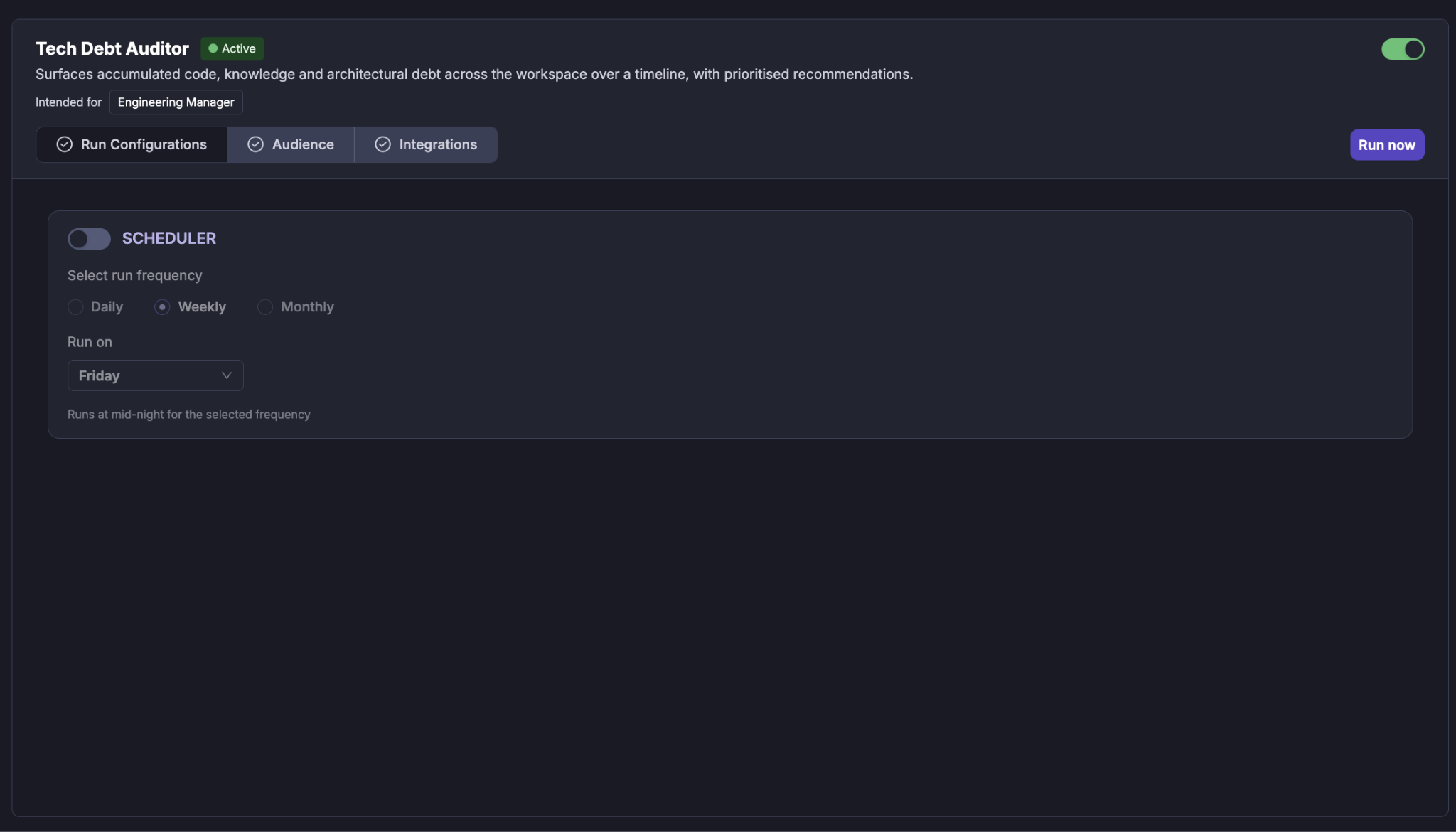
Scheduler
Use the Scheduler toggle to enable or disable automatic execution of the agent.
When enabled, you can select the required run frequency:
Daily
Weekly
Monthly
For a weekly schedule, select the day on which the audit should run.
For example:
Weekly → Wednesday
The agent runs at midnight for the configured schedule.
Scheduled audit window
Tech Debt Auditor compares two periods:
The current audit window
The previous equivalent window
For scheduled execution, the audit window is determined automatically from the scheduled runs. The first scheduled execution uses a recent default window; subsequent runs can compare the current period with the preceding equivalent period.
This comparison is important because the agent does not treat the amount of activity alone as technical debt. It looks for evidence and changes in patterns over time.
2. Audience
The Audience section determines who receives the results of the agent.
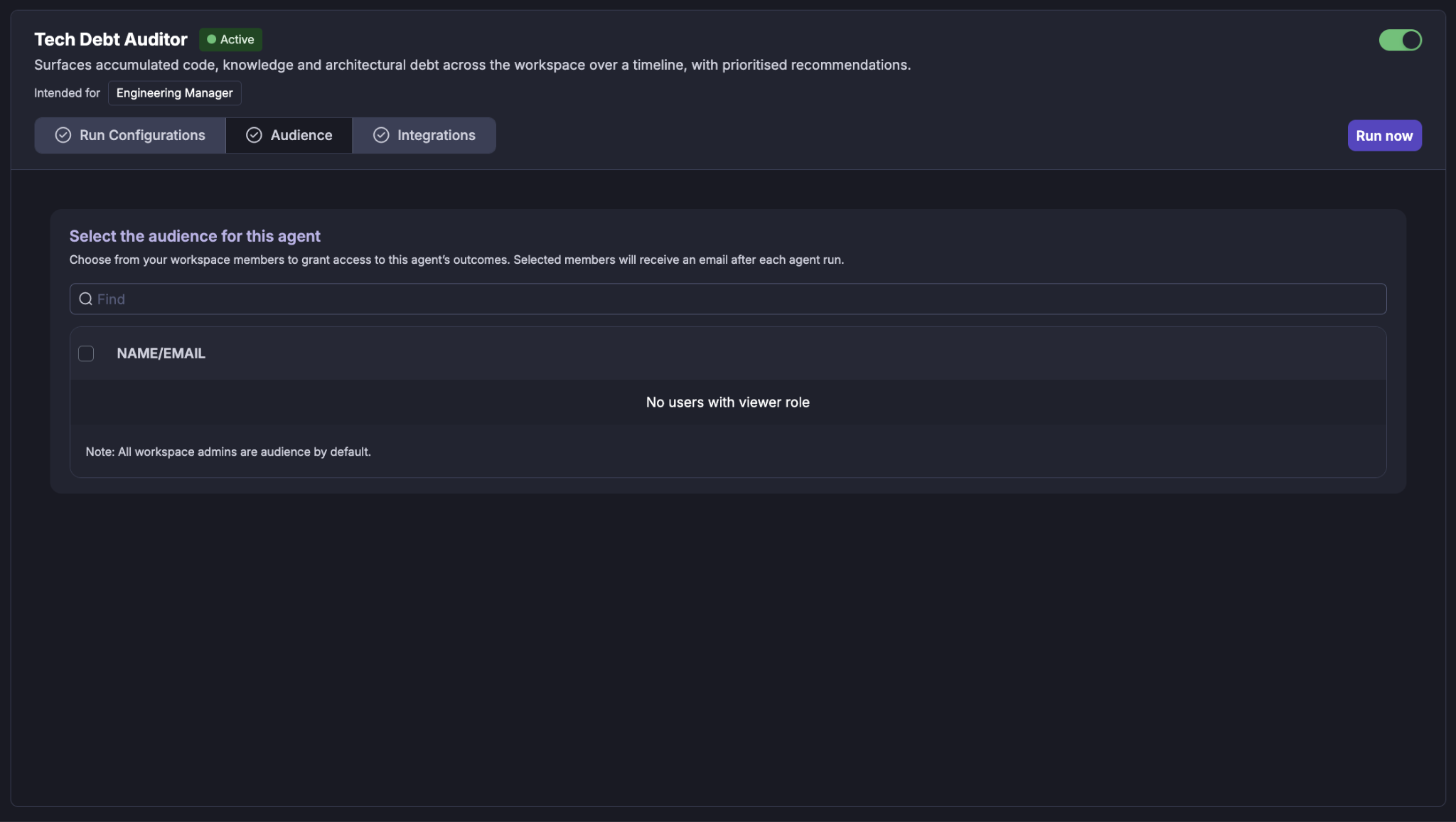
Select the workspace members (Viewers) who should have access to the agent's outcomes.
Selected members receive an email after each agent run when email delivery is configured.
Selecting users
Use the Find field to search for a workspace member by name or email. Select the required users using the checkbox next to their name.
Workspace administrators are included as audience members by default.
If there are no users with the required viewer role, the audience list will indicate that no eligible users are available.
3. Integrations
Tech Debt Auditor uses connected engineering tools to establish the context needed to identify technical debt.
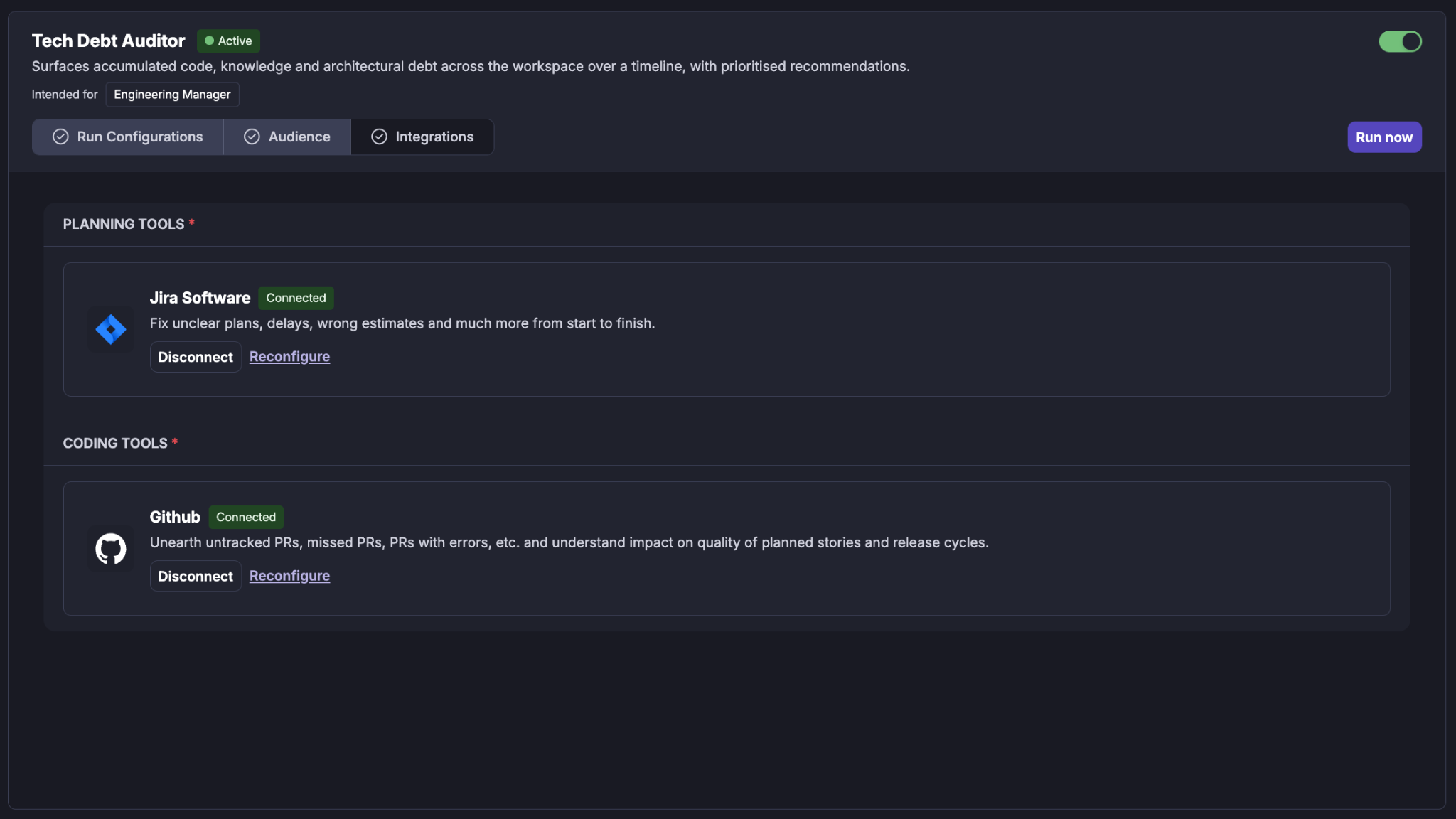
The Integrations section shows the tools required by the agent. The integrations are grouped by purpose.
Planning Tools
For example: Jira Software
Jira provides the planning context associated with the changes being reviewed, including stories and related work items.
A connected integration is displayed with a Connected status.
You can:
Disconnect the integration.
Reconfigure the integration.
Coding Tools
For example: GitHub
The coding integration provides the pull requests and code-change information used by the agent.
The agent uses merged pull requests as the primary source of changes for an audit.
Architectural context
Tech Debt Auditor also consumes the architectural-drift results produced by ADR Drift Auditor.
The Tech Debt Auditor does not re-evaluate ADRs itself. This ensures that architectural findings remain consistent between the two agents.
Running a Tech Debt Audit
The agent can be run in two ways:
Manual run
To start an audit manually, select Run now.
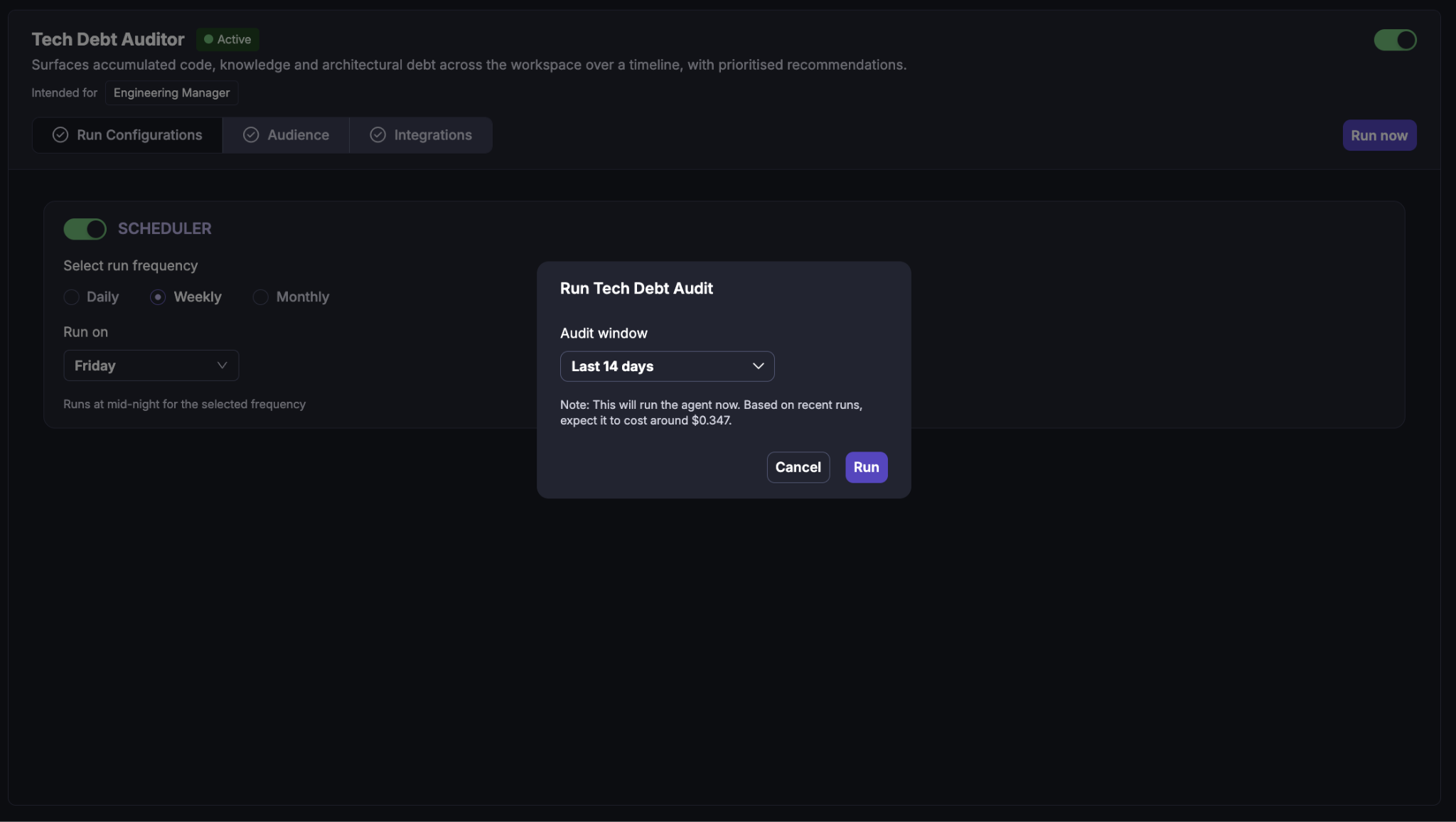
A Run Tech Debt Audit dialog appears.
Audit window
Select the period you want the agent to evaluate.
The available audit window can be based on a supported preset or a configured date range.
The Run dialog also displays an estimated cost based on recent agent runs.
For example, the dialog may show:
Based on recent runs, expect it to cost around $0.347.
Select:
Cancel to close the dialog without running the audit.
Run to start the audit.
Scheduled run
When the Scheduler is enabled, the agent automatically runs according to the configured cadence.
This is useful for making Tech debt audit part of the regular engineering governance process.
What happens during an audit?
Once an audit starts, Cubyts follows a controlled sequence.
Step 1: Identify the audit context
The agent validates the selected audit window and determines the equivalent window immediately before it.
For example:
Current window: July 14 → July 28
Previous window: June 30 → July 14
The two windows have the same duration.
The previous window provides the baseline required to determine whether a debt signal is:
Getting worse
Getting better
Holding steady
At baseline
Insufficient history
An empty previous window does not cause the audit to be skipped. Instead, the report identifies the lack of historical data.
Step 2: Identify code activity
The agent identifies merged pull requests in both the current and previous windows.
For each change, the agent collects available information such as:
Pull request
Author
Title and description
Changed files
Code areas
Additions
Deletions
Commits
Reviewers
Review comments
Developer responses
AI-related mentions
Whether the pull request title appears to indicate a revert
The report is PR-centric. Direct commits pushed to the main branch without a pull request are not evaluated.
Revert detection
The agent identifies pull requests whose title starts with "Revert".
This is a title-based heuristic rather than a verified Git revert signal.
Therefore, the report refers to these as:
PRs titled as reverts
rather than claiming that a specific number of commits were actually reverted.
Step 3: Collect code-review signals
The agent retrieves code-review information associated with the changes in both windows.
The signals include:
Cubyts-valid code-review findings
Tech-debt risk predictions
Negative developer insights
These signals provide evidence for potential code and knowledge debt.
The agent uses the underlying code-review source rather than the consolidated workspace flag store so that disabled workspace flag configuration does not silently remove debt evidence from the audit.
The current version does not consume an external SAST/SCA source.
When no external SAST/SCA integration is available, this is reported as a signal coverage gap rather than being interpreted as evidence that the code is clean.
Step 4: Collect architectural-debt signals
Tech Debt Auditor retrieves the results of the ADR Drift Auditor for the current and previous windows.
It uses the ADR Drift Auditor's completed results to determine:
Which architectural drift findings affected the relevant periods.
How many violations were associated with the affected areas.
Whether the architectural signal is increasing or decreasing.
The agent does not independently re-evaluate ADRs or pull requests.
This is intentional. Recomputing architectural drift independently could result in the two agents reaching different conclusions about the same change.
If no suitable ADR Drift Auditor result is available, the report identifies:
ADR drift unavailable as a coverage gap, the agent never fabricates architectural findings.
Step 5: Evaluate the three debt dimensions
The agent evaluates technical debt across three dimensions.
Code debt
Code debt looks for evidence that implementation quality or maintainability may be deteriorating.
Examples include:
Recurring code-review findings.
Findings concentrated around repeated changes.
Review concerns that remain unresolved.
Code-review signals that increase relative to the previous period.
High code activity by itself is not treated as debt.
The presence of many commits or large changes is only meaningful when supported by additional debt evidence.
Knowledge debt
Knowledge debt identifies situations where understanding of an area may be concentrated or insufficiently shared.
Examples include:
A single contributor owning most changes in an area.
New implementation owned by one author with little review engagement.
AI-assisted changes receiving limited review.
Pull requests without linked work items.
Clusters of negative developer-insight signals.
The purpose is not to identify an individual as responsible for the debt. The agent surfaces the pattern at the code-area level so that the Engineering Manager can decide what action is appropriate.
Architectural debt
Architectural debt represents the impact of architectural drift detected by the ADR Drift Auditor.
The Tech Debt Auditor considers:
The number of relevant architectural violations.
The affected code areas.
The comparison with the previous period.
Architectural findings in this report are intentionally area-level. Detailed ADR, pull-request, and violation information remains available through the ADR Drift Auditor.
Step 6: Determine trajectory and severity
The agent compares the current window with the previous equivalent window.
This allows each area to receive a trajectory such as:
Getting worse
Getting better
Holding steady
Baseline
Insufficient history
An area can show debt in one, two, or all three dimensions.
Areas affected by multiple debt dimensions are given greater importance, particularly when their trajectory indicates deterioration.
The ranking therefore considers both:
Current severity + trajectory
rather than simply counting the number of changes.
Step 7: Generate prioritised recommendations
The agent produces recommendations for the highest-priority debt areas.
Recommendations are designed to help the Engineering Manager decide what to investigate or address.
Each recommendation includes:
Recommendation — the proposed option.
Why — the evidence supporting it.
Trade-off — what the team may need to accept if it follows the recommendation.
Recommendations are options, not directives.
The agent does not:
Assign work to a named individual.
Recommend hiring.
Recommend a specific budget.
Decide that an employee should own a remediation.
Automatically change code or architecture.
The Engineering Manager remains responsible for deciding what action to take.
Step 8: Generate and deliver the report
After the analysis is complete, Tech Debt Auditor generates a report and stores it in Cubyts.
Where email delivery is configured, an email digest is also sent to the configured audience.
The report provides a workspace-level summary followed by the most important code areas and recommendations.
Understanding the Tech Debt Report
The Tech Debt report provides a consolidated view of the technical debt signals observed during the selected period.
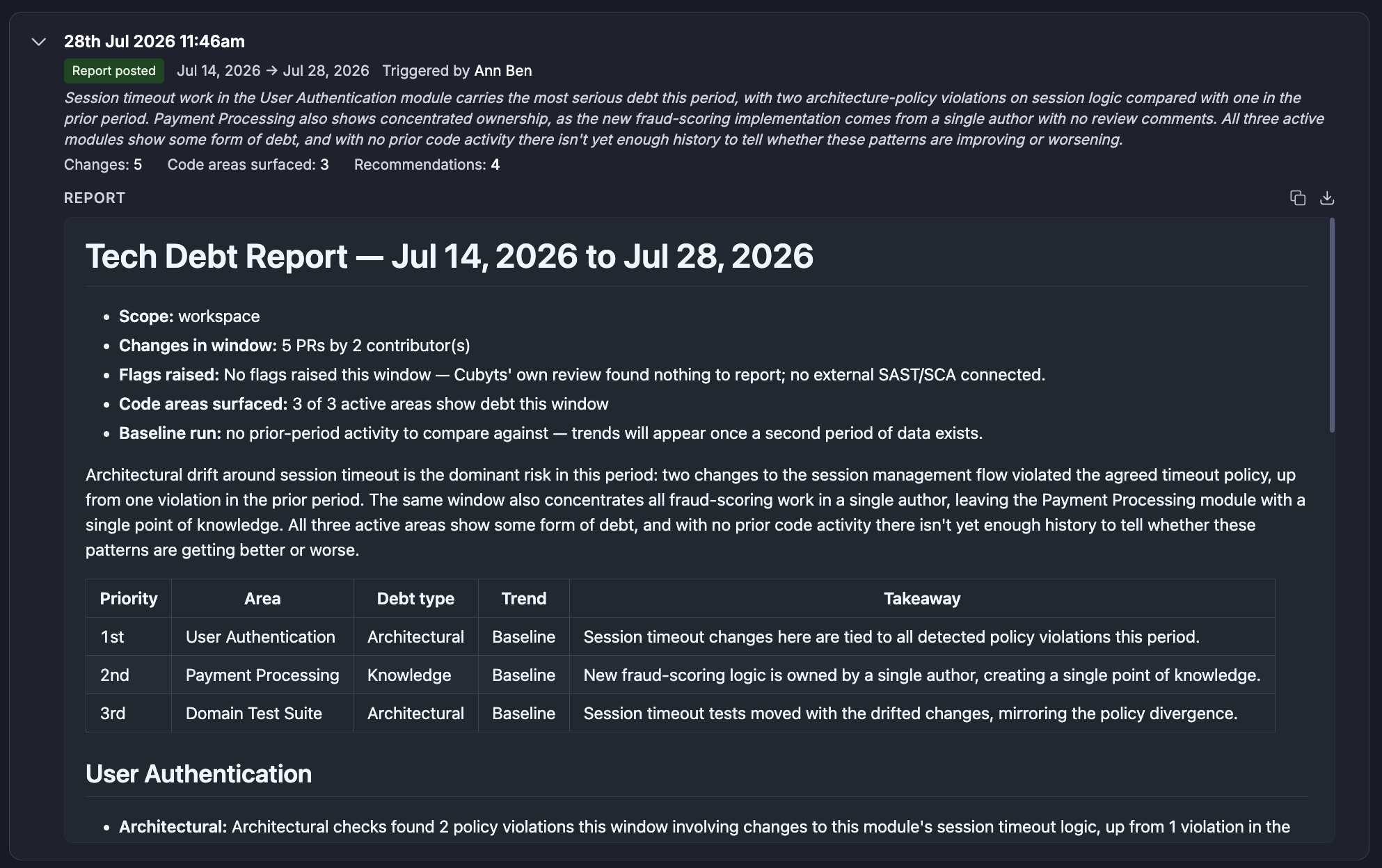
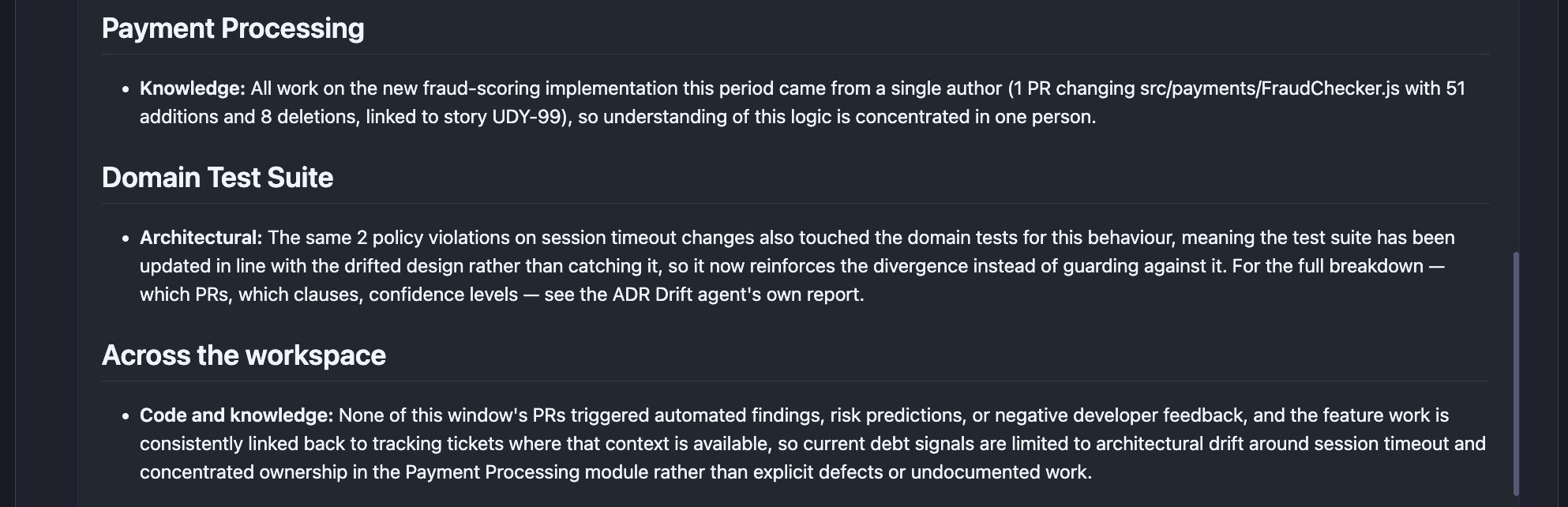
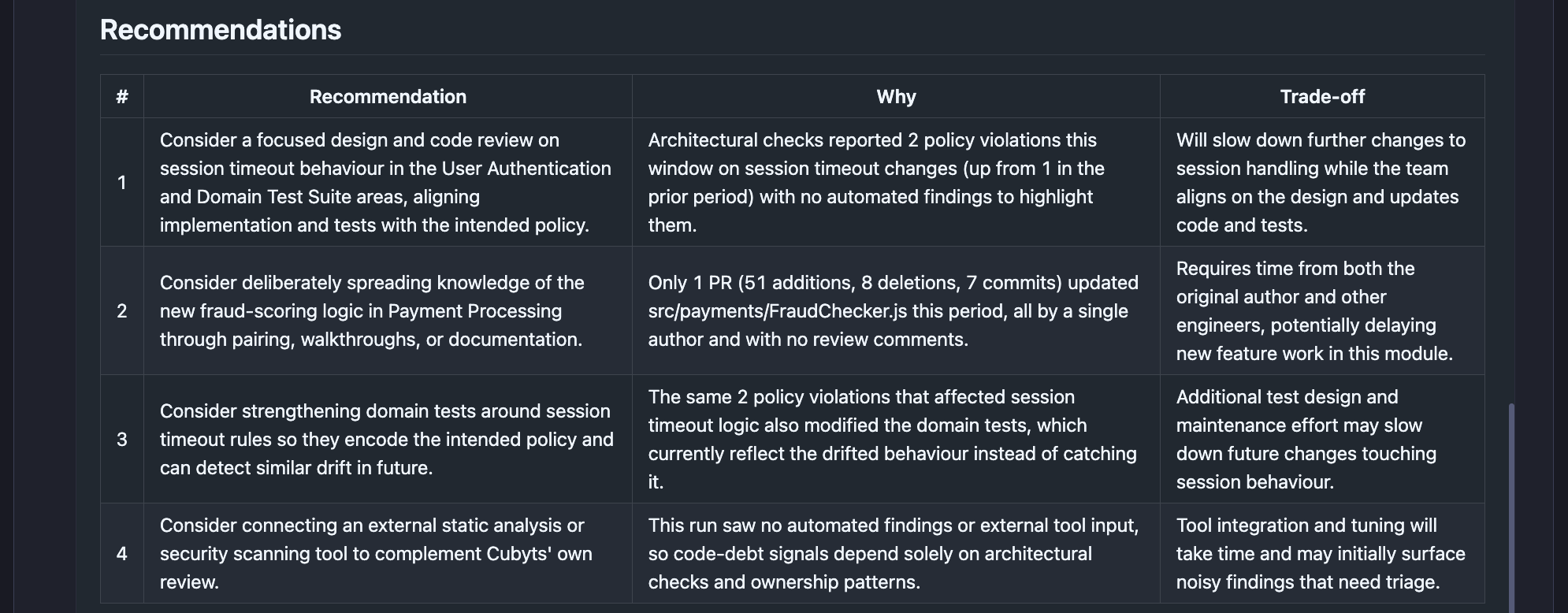

A typical report contains:
Audit summary
Prioritised debt areas
Code-area analysis
Recommendations
Signal coverage gaps
Audit summary
The report header provides high-level context about the audit.
Typical information includes:
Audit window
Number of changes evaluated
Number of active contributors
Number of code areas surfaced
Number of recommendations
Code-review signal counts
Revert-title counts
Whether the audit has a prior-period baseline
For example, a report may begin with a summary such as: Session timeout work in the User Authentication module carries the most serious debt this period, with two architecture-policy violations compared with one in the prior period.
The summary gives the manager a quick understanding of where the most important signal is before reading the detailed sections.
Prioritised debt areas
The report ranks the code areas where debt signals are most significant.
A typical summary table contains:
The table provides a quick way to identify where the manager should focus attention.
Code area details
Each surfaced area can contain one or more debt dimensions.
For example:
User Authentication: The report may identify an Architectural signal describing changes to session-timeout behavior and compare the number of detected policy violations with the previous period.
Payment Processing: The report may identify a Knowledge signal where a new fraud-scoring implementation was introduced by a single author, creating a concentration of knowledge.The report can include supporting implementation details such as:
Pull request count
Files changed
Additions and deletions
Story linkage
Author concentration
Review engagement
Domain Test Suite: The report may identify an architectural signal when tests have changed in a way that follows or reinforces the observed architectural drift. The detailed ADR-level explanation remains the responsibility of the ADR Drift Auditor.
Signal coverage gaps
The Tech Debt Auditor follows an important principle:
Not evaluated is different from clean.
If the agent cannot obtain a particular type of evidence, it does not silently assume that no debt exists.
Instead, the limitation is surfaced in the Signal coverage gaps section.
Common coverage gaps include:
No external SAST/SCA: The current version does not consume an external SAST/SCA source. Therefore, code-debt signals are based on Cubyts' own code-review information and other available evidence.
AI-authorship limitations: Per-commit AI-authorship tags are not available.
AI-related signals are therefore based on available pull-request title or description information rather than verified per-commit authorship.
ADR Drift unavailable: If the ADR Drift Auditor has not produced a usable result for the relevant period, architectural debt cannot be evaluated from that source. The report identifies this as a coverage gap.
Insufficient historical data: If there is no previous equivalent window with usable activity, the agent does not invent a trend. The relevant areas are reported with insufficient history.
Recommendations
The Recommendations section converts the observed signals into prioritised options.
A recommendation table typically contains:
The recommendations are intentionally framed as options with trade-offs so that the Engineering Manager can make the final decision.
What Tech Debt Auditor does not do
Tech Debt Auditor is an audit and reporting agent.
It does not:
Modify source code.
Resolve code-review findings.
Modify ADRs.
Modify Jira stories.
Modify pull requests.
Automatically remediate technical debt.
Recompute architectural drift independently.
Assign remediation work to individuals.
Recommend hiring or budget changes.
Decide whether an architectural decision itself should be changed.
The Engineering Manager and engineering team remain responsible for deciding whether identified debt should be corrected, accepted, investigated further, or addressed through changes to the architecture or development process.
Tech Debt Auditor vs. ADR Drift Auditor
The two agents complement each other.
Tech Debt Auditor uses the ADR Drift Auditor as its architectural source of truth so that architectural findings remain consistent across the two reports.
Summary
Tech Debt Auditor compares what the team shipped with the period before across code, knowledge, and architecture, shows where technical debt is building up and how the pattern is changing, and gives the Engineering Manager evidence-backed options for where to focus next.
Was this article helpful?
That’s Great!
Thank you for your feedback
Sorry! We couldn't be helpful
Thank you for your feedback
Feedback sent
We appreciate your effort and will try to fix the article