The Requirement Drift Detector agent helps engineering teams identify when the implementation delivered through merged pull requests drifts from the requirements defined for a work item.
It evaluates the merged PRs associated with a work item and identifies potential deviations such as:
Missing functionality — required behavior is not implemented.
Extra functionality — behavior has been added that is not required.
Incorrect implementation — the required behavior exists, but the implementation does not correctly satisfy the requirement.
The agent provides evidence for each finding, including the affected pull request and file, along with a confidence level and explanation.
The agent is intended for Engineering Leads who want visibility into whether delivered code actually implements what was requested without manually reviewing every requirement and merged PR.
What does the Requirement Drift Detector do?
A typical delivery flow starts with a requirement captured in a work item, followed by implementation and one or more pull requests.
Over time, the implementation can drift from the original requirement. For example:
A required scenario may not be implemented.
Additional behavior may be introduced that was not part of the requirement.
The implementation may appear to satisfy the requirement but behave differently from what was requested.
The Requirement Drift Detector automatically:
Identifies the requirement associated with a work item.
Finds merged pull requests linked to that work item.
Collects available code-change evidence from those pull requests.
Evaluates the implementation against the requirement.
Performs a second, adversarial review of potential drift.
Filters findings according to the configured confidence threshold.
Generates a report with file-level findings and evidence.
Sends an email digest when recipients are configured.
In simple terms:
Requirement Drift Detector checks whether what your team shipped actually matches what the work item asked for.
Before you start
For the agent to produce meaningful results, the workspace should have:
Requirement-bearing work items available through the connected planning tool.
A connected planning tool such as Jira Software.
A connected coding tool such as GitHub.
Merged pull requests associated with the work item being evaluated.
Code analysis information available for the relevant pull requests.
Appropriate workspace members configured as the audience if result access or email notification is required.
The agent works with requirement and engineering information available through the connected Cubyts integrations.
The requirement used for evaluation is built from the work item's available title, description, and, where applicable, acceptance criteria.
Configure Requirement Drift Detector
To configure the agent, open:
Settings → Agents → Requirement Drift Detector
The configuration screen consists of three sections:
Run Configurations
Audience
Integrations
The agent can be enabled or disabled using the toggle in the top-right corner.
The agent is intended for Engineering Lead users.
1. Run Configurations
The Run Configurations section determines which work items are treated as requirements and how the agent obtains requirement context when evaluating implementation work.
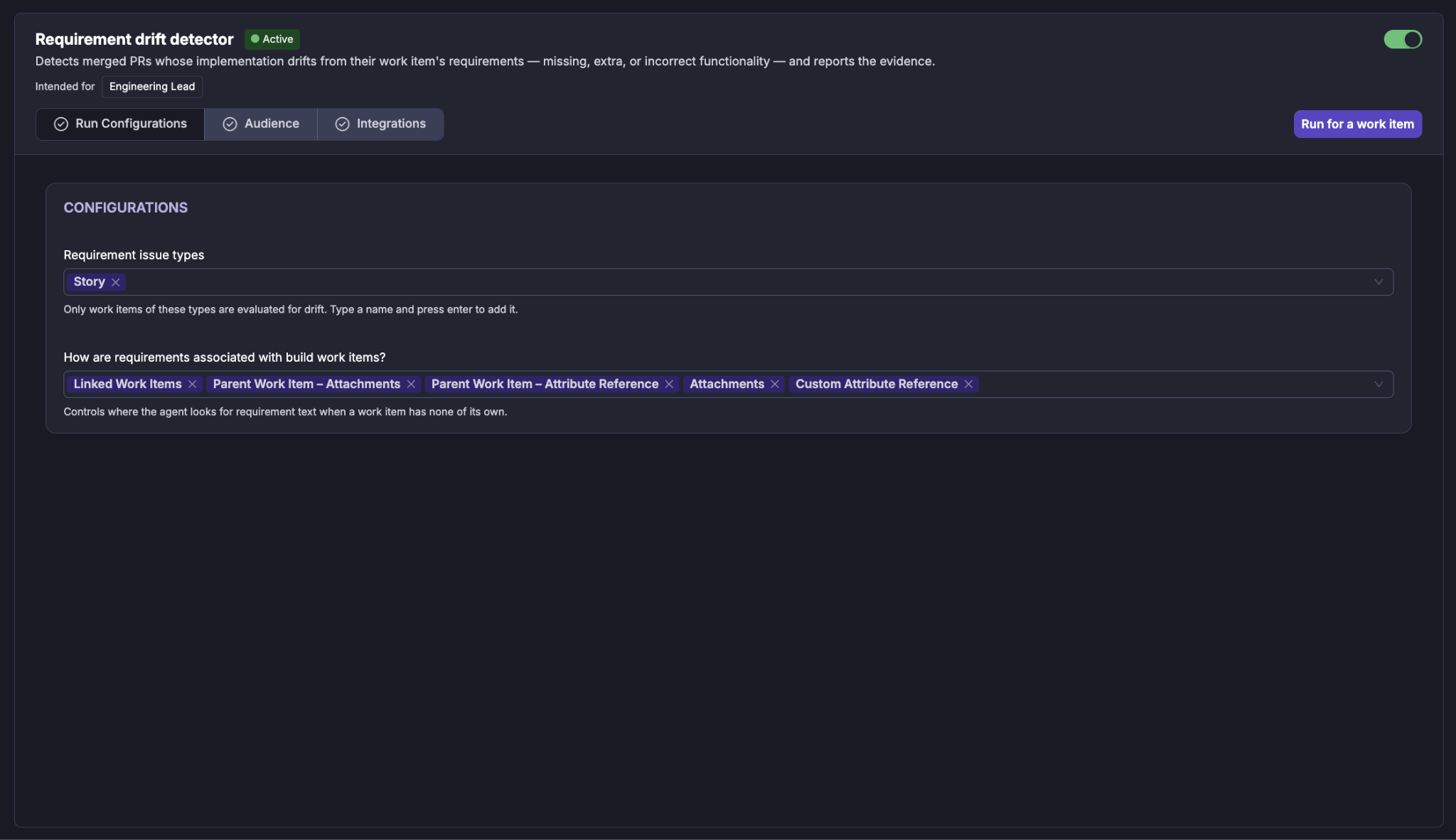
Requirement issue types
Use Requirement issue types to specify which work-item types should be evaluated.
For example:
Story
Only work items whose issue type matches the configured requirement issue types are treated as requirements by the agent.
This prevents unrelated work items from being evaluated as product or implementation requirements.
The configuration shown in the UI uses Story as the configured requirement issue type.
How are requirements associated with build work items?
The agent can obtain requirement context through the configured relationships between a requirement and the work item containing the implementation.
The available association mechanisms shown in the configuration are:
Linked Work Items
Parent Work Item – Attachments
Parent Work Item – Attribute Reference
Attachments
Custom Attribute Reference
These options control where the agent looks for requirement text when a build work item does not contain all of the requirement information itself.
This allows requirement context to be discovered from related work items and configured references rather than requiring every implementation work item to contain the complete requirement.
2. Audience
The Audience section determines who receives the results of the agent.
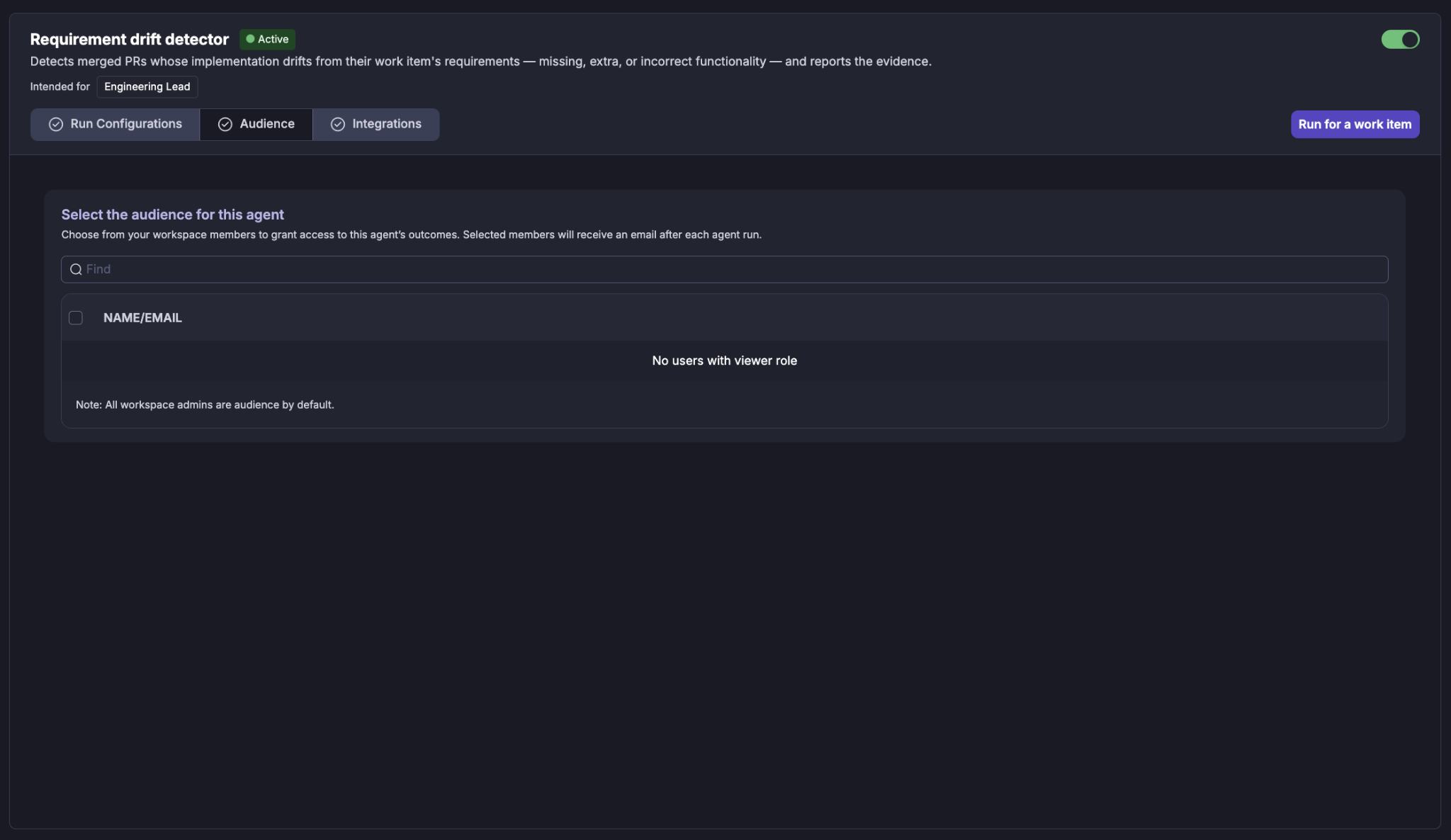
Select the workspace members (Viewers) who should have access to the agent's outcomes.
Selected members receive an email after each agent run when email delivery is configured.
Selecting users
Use the Find field to search for a workspace member by name or email. Select the required users using the checkbox next to their name.
Workspace administrators are included as audience members by default.
If there are no users with the required viewer role, the audience list will indicate that no eligible users are available.
3. Integrations
Requirement Drift Detector uses information from connected engineering tools to establish the relationship between a requirement and the code changes that implement it.
The Integrations section groups the required tools by purpose.
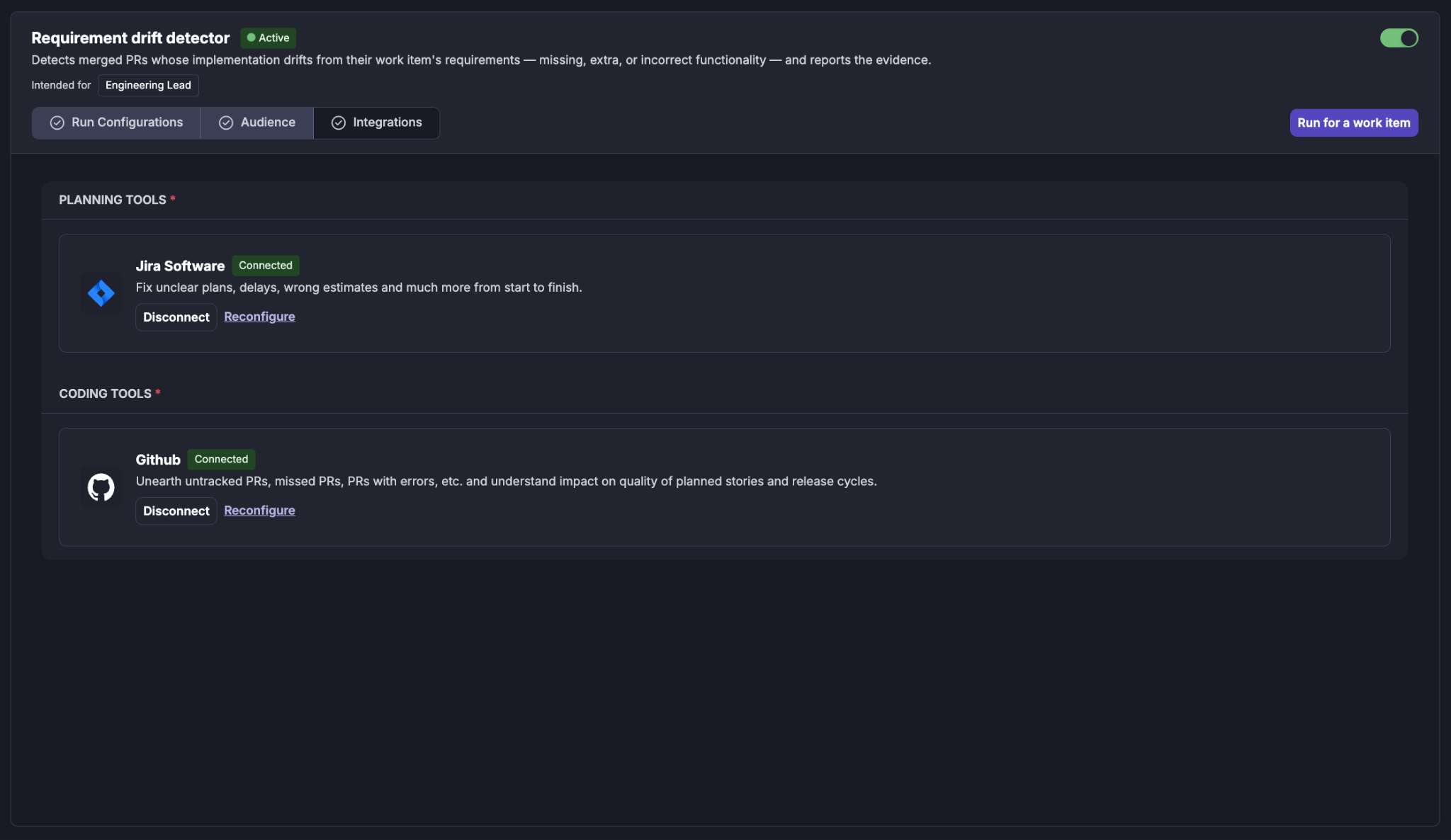
The Integrations section shows the tools required by the agent. The integrations are grouped by purpose.
Planning Tools
For example: Jira Software
Jira provides the planning context used by the agent, including:
Work items
Requirement information
Stories
Related work items
Relationships between requirements and implementation work
A connected integration is displayed with a Connected status.
You can:
Disconnect the integration.
Reconfigure the integration.
Coding Tools
For example: GitHub
GitHub provides the pull requests and code-change information used by the agent.
The agent evaluates merged pull requests associated with the work item.
The coding information provides the evidence required to determine whether the implementation satisfies the requirement.
A connected integration is displayed with a Connected status.
You can:
Disconnect the integration.
Reconfigure the integration.
Running an Requirements Drift Detector
The agent can be run in two ways:
Manual run
A lead can initiate a check for a specific work item using Run for a work item.
When selected, Cubyts displays the Run Requirement Drift Check dialog.
Enter the required Work item key.
For example: PROJ-123
The agent evaluates the selected work item and its merged pull requests immediately.
The dialog also displays an estimated run cost based on recent runs.
Select:
Run to start the check.
Cancel to close the dialog without running it.
The manual run evaluates the current state of the work item and its merged PRs. It does not require a scheduled window or sprint/completion gating.
Automatic run on Merge
The agent can also be triggered when a pull request associated with a configured requirement is merged.
When a qualifying PR merge occurs, the agent evaluates the associated work item.
If the work item's merged-PR set has not changed since the last completed automatic run, the agent can skip the run rather than repeat the same evaluation.
This makes the detector suitable for continuous requirement-to-implementation validation.
What happens during a Requirement Drift Check?
Once an audit starts, Cubyts follows a controlled sequence.
Step 1: Validate the requirement context
The agent first resolves the selected work item and determines whether it contains sufficient requirement information.
The requirement context can include:
Work-item title
Description
Acceptance criteria where available
Related work-item information
Parent work-item information
Configured requirement references
The agent also identifies the merged PRs associated with the work item.
If the work item cannot be treated as a configured requirement, does not contain usable requirement information, or has no merged PRs to evaluate, the run can be skipped.
The agent does not treat an unavailable requirement as a clean implementation.
Step 2: Collect PR and code-change evidence
The agent collects evidence for the merged pull requests associated with the requirement.
Available evidence can include:
Pull request information
Author
Changed files
Modified code structures
Code-area information
File-level change summaries
Actual pull-request diff information where supported
For GitHub, GitLab, and Bitbucket Cloud, the agent can retrieve the live pull-request diff from the provider when evaluating the change.
For Azure DevOps and Bitbucket Data Center, live diff retrieval is not currently supported. The evaluation therefore relies on the available persisted code-analysis evidence.
If sufficient evidence cannot be generated for a PR, the agent does not silently treat that PR as clean. The PR is reported as not fully evaluated.
Step 3: Summarize the changes
The available requirement and code evidence is packaged into a structured input for the AI evaluation.
The agent creates a file-level view of the implementation so that the requirement can be compared against the actual changes.
Requirement context is scoped to the relevant code changes where possible.
This ensures that the AI evaluates the implementation against the requirement rather than simply comparing two large, unrelated text blocks.
Step 4: Judge requirement drift
The AI evaluates whether each relevant code change correctly implements the requirement.
Potential drift is classified into three categories.
Missing functionality
The requirement expects behavior that is absent from the implementation.
Example: The requirement specifies that expired sessions must be cleaned up, but the implementation does not update sessions that cross the expiration threshold.
Extra functionality
The implementation introduces behavior that is not required by the work item.
Example: The requirement describes updating active sessions, but the implementation also changes already-invalidated sessions.
Incorrect implementation
The required behavior is present, but the implementation does not correctly satisfy the requirement.
Example: The implementation performs the cleanup operation but returns the total number of expired sessions instead of the number of sessions actually updated.
Only findings that meet the configured internal confidence threshold are retained.
Step 5: Verify potential violations
Potential findings go through a second review.
The verification step asks whether the apparent drift could instead be explained by:
A legitimate interpretation of the requirement.
An intentional implementation decision.
A requirement change that is reflected elsewhere in the available context.
Insufficient evidence to make a reliable determination.
This additional review is intended to reduce false positives.
Step 6: Generate the report
Confirmed findings are assembled into a report.
The report is organized around the affected pull requests and provides file-level evidence for each finding.
Findings include their category and confidence so that an engineering lead can quickly understand where the implementation may have diverged from the requirement.
Step 7: Deliver the results
The final report is stored in Cubyts.
When recipients are configured, an email digest is also sent to the configured audience.
The agent does not post a comment to the pull request or work item.
Understanding the Requirements drift detector agent
The report provides a consolidated view of how the merged pull requests associated with a work item implement its requirement.
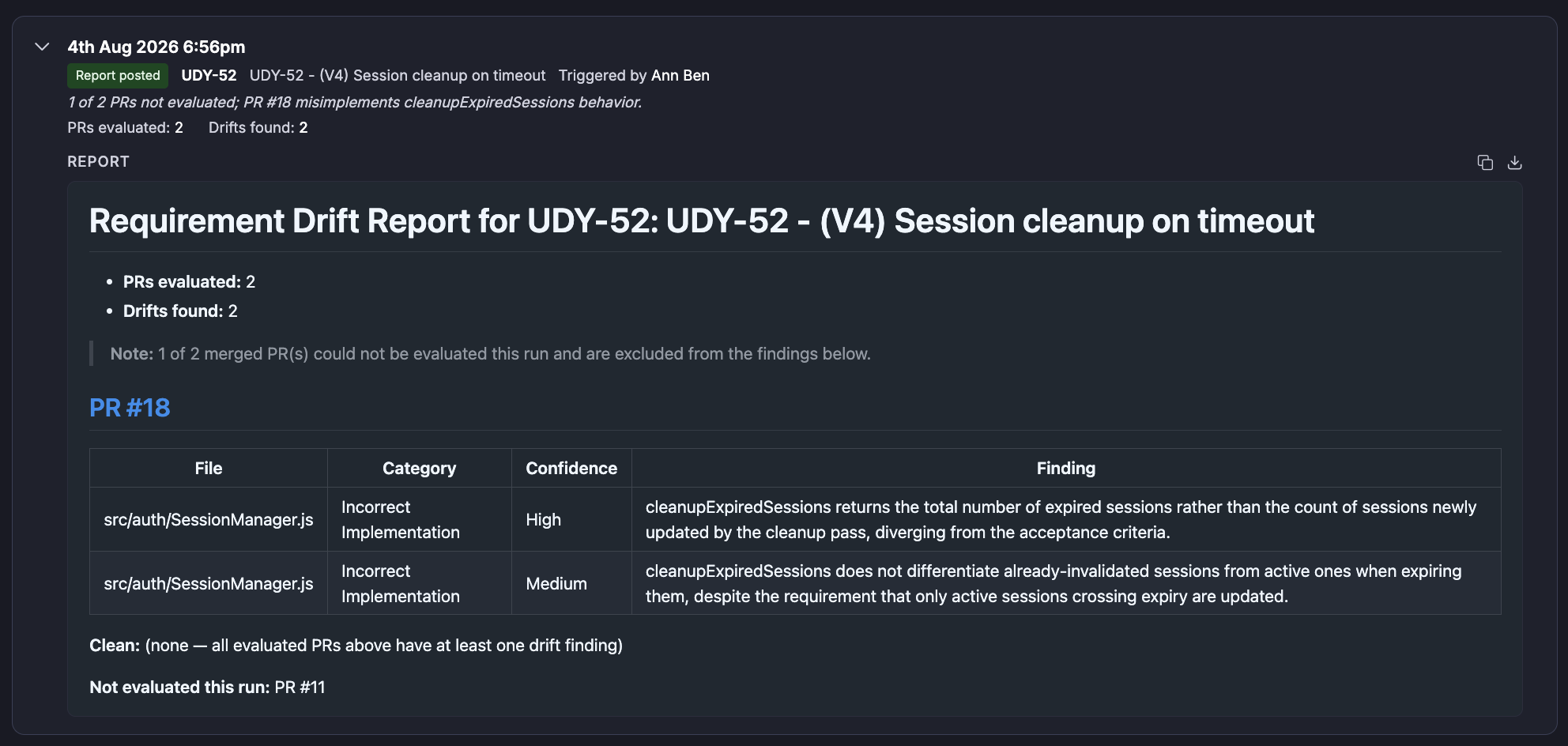
It includes:
Work-item summary
The report identifies:
Work item being evaluated
Requirement title
Number of PRs evaluated
Number of drift findings
Any PRs that could not be evaluated
For example, a report may show:
PRs evaluated: 2
Drifts found: 2
If some merged PRs could not be evaluated, the report explicitly calls this out rather than presenting the work item as completely clean.
Pull-request findings
For each PR where drift is identified, the report provides:
Pull request
Changed file
Drift category
Confidence
Finding
The current report uses the following categories:
Confidence
Findings are presented with a confidence level.
The report uses:
High
Medium
Low-confidence findings are filtered out before they are included in the final report.
This is intended to keep the report focused on findings with meaningful evidence rather than speculative differences.
Example Requirement Drift Finding
The sample output report demonstrates a work item:
UDY-52 — Session cleanup on timeout
The report shows:
PRs evaluated: 2
Drifts found: 2
1 of 2 PRs could not be evaluated
For PR #18, the report identifies two findings against: src/auth/SessionManager.js
Finding 1 — High confidence
Category: Incorrect Implementation
The implementation returns the total number of expired sessions rather than the number of sessions newly updated by the cleanup operation.
Finding 2 — Medium confidence
Category: Incorrect Implementation
The implementation does not distinguish already-invalidated sessions from active sessions when expiring them, even though the requirement specifies that only active sessions crossing expiry should be updated.
The report also explicitly identifies the PR that was not evaluated.
This distinction is important: A PR that could not be evaluated is not treated as a clean PR.
Handling incomplete evaluation
Requirement Drift Detector deliberately distinguishes between no drift found and not evaluated.
A PR can be excluded from the findings when the required evidence cannot be reliably generated.
Examples include:
AST information is not yet available.
Live pull-request diff retrieval fails.
Required repository information is unavailable.
Code evidence cannot be generated for the affected files.
When this happens, the report identifies the affected PR rather than silently assuming that the implementation is correct.
A completed run with zero drift is therefore meaningful only when the relevant PRs were actually evaluated.
Automatic exclusion and skip conditions
The agent can skip a work item when it cannot establish a meaningful requirement-to-implementation evaluation.
Common cases include:
What the Requirement Drift Detector does not do
Requirement Drift Detector is an audit and reporting agent.
It does not:
Modify source code.
Modify the work item or requirement.
Modify pull requests.
Automatically fix detected drift.
Post comments to pull requests or work items.
Decide whether a detected deviation should be accepted.
Gate delivery based on the findings.
Evaluate direct commits that are not represented through the supported pull-request workflow.
The engineering team remains responsible for deciding whether a finding represents:
A defect that should be corrected.
An intentional behavior that should be accepted.
A requirement that needs clarification.
A requirement that should be updated.
Important boundaries
Merged pull requests are the unit of implementation evidence
The agent evaluates the implementation delivered through merged pull requests associated with the work item. It is not a general-purpose code scanner.
Evidence availability affects evaluation quality
The quality of the result depends on the requirement and code evidence available to Cubyts.
For supported providers such as GitHub, GitLab, and Bitbucket Cloud, the agent can retrieve live PR diffs during evaluation.
For Azure DevOps and Bitbucket Data Center, the current implementation does not provide live diff retrieval, so the evaluation relies on available AST evidence.
The agent does not silently convert missing evidence into a clean result
When evidence is unavailable, the report surfaces the limitation.
This is an important design principle: Not evaluated is different from clean.
Summary
Requirement Drift Detector continuously checks whether shipped code matches the requirements captured in work items.
It:
Finds the requirement and its associated merged PRs.
Collects available implementation evidence.
Evaluates the implementation for missing, extra, and incorrect functionality.
Performs an adversarial verification pass to reduce false positives.
Produces file-level findings with confidence and evidence.
Clearly identifies PRs that could not be evaluated.
Stores the report in Cubyts and optionally sends an email digest.
The agent gives engineering leads visibility into whether the implementation delivered through merged PRs actually matches the requirement—while leaving the final decision about what to change or accept with the engineering team.
Was this article helpful?
That’s Great!
Thank you for your feedback
Sorry! We couldn't be helpful
Thank you for your feedback
Feedback sent
We appreciate your effort and will try to fix the article