The Code Reviewer agent monitors code quality, security vulnerabilities,
and coding standards across repositories based on the configured
guardrails.
The agent is designed for Engineering Leads and Engineers who
want consistent, evidence-based review of pull requests and code
branches before changes are merged.
What does the Code reviewer do?
Code changes can introduce correctness, maintainability, security, and
reliability risks that are difficult to identify consistently through
manual review alone. The Code Reviewer evaluates pull requests and code
branches against configured guardrails and surfaces actionable findings.
The agent:
Evaluates pull requests or code branches according to the configured
monitoring scope.Applies the configured work-item, age, severity, and validation
settings.Checks code quality guardrails such as knowledge gaps,
maintainability risks, regression risks, and database-related
issues.Checks code security guardrails such as code smells, risk of bugs,
and security vulnerabilities.Identifies concrete code issues and affected files.
Generates predictions about the potential impact of identified
changes.Generates developer insights based on recurring code and engineering
patterns.Provides suggested resolutions for identified issues.
Shows the context of the pull request, including authors, reviewers,
source branch, and target branch.Shows contributing pull requests that were used as historical
context for the analysis.
In simple terms: Code Reviewer helps engineering teams identify and
understand code risks before they become production or maintenance
problems.
Before you start
For the agent to produce meaningful results, the workspace should have:
A connected planning tool such as Jira Software.
A connected coding/source-control tool such as GitHub.
Pull request and repository data available in Cubyts.
Appropriate workspace members configured as the audience.
The guardrails enabled for the quality and security checks the team
wants to enforce.
The supplied configuration shows Jira Software connected under
Planning Tools and GitHub connected under Coding Tools.
Configure Code Reviewer
To configure the agent, open:
Settings → Agents → Code Reviewer
The configuration is organised into four sections:
Guardrails
Run Configurations
Audience
Integrations
The agent can be enabled or disabled using the toggle in the top-right
corner.
The agent is intended for Engineering Leads and Engineers.
1. Guardrails
The Guardrails section controls the conditions that the Code
Reviewer evaluates.
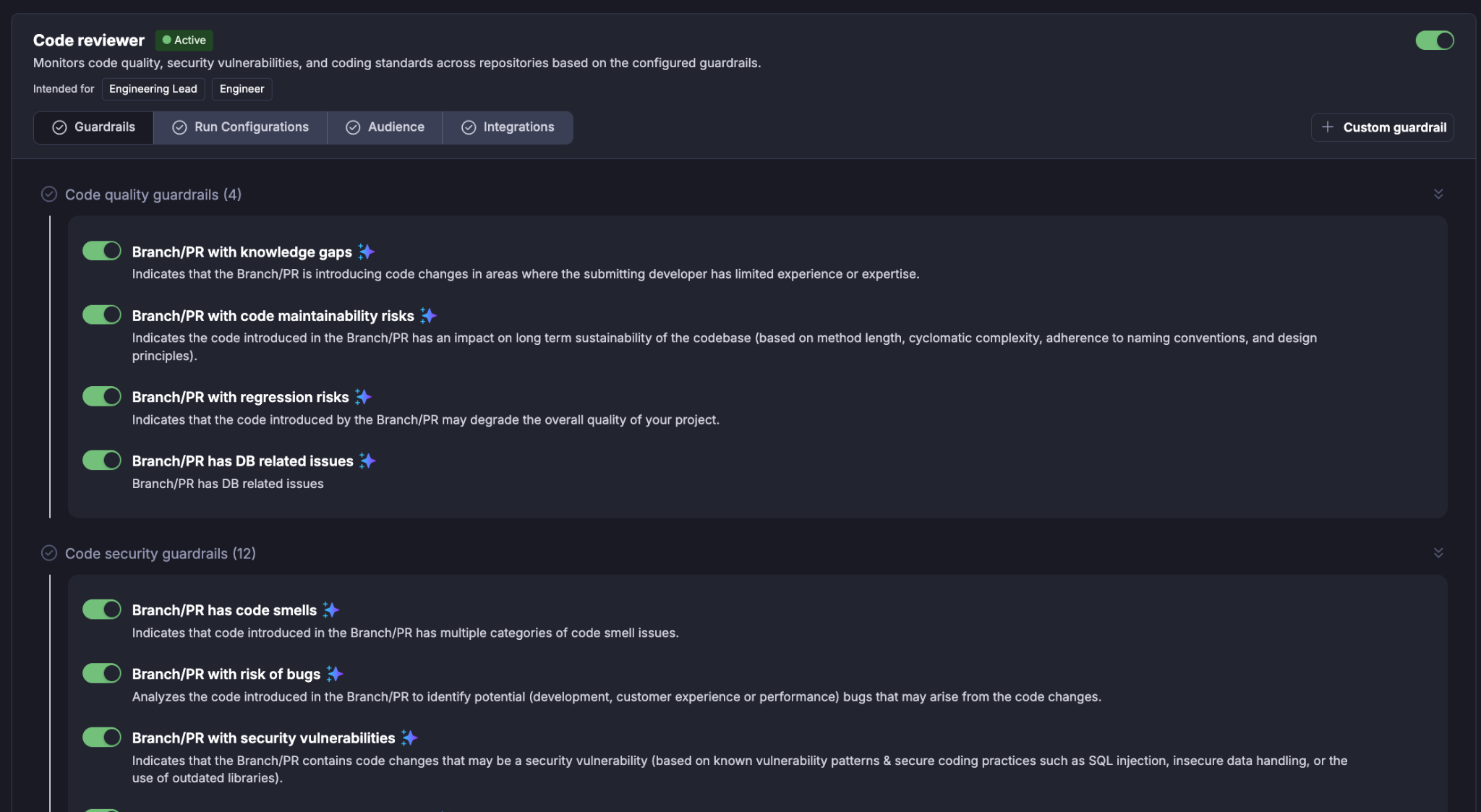
Guardrails are grouped into categories so that teams can selectively
enable the types of code risks they want the agent to surface.
Code quality guardrails focus on code quality issues e.g. maintainability issues, regression risks, knowledge gaps, etc.
Code security guardrails focus on security issues in code e.g. code smells, risk is bugs, security vulnerabilities, OWASP checks, etc.
The end user can also define custom guardrails and provide conditions for validations.
2. Run Configurations
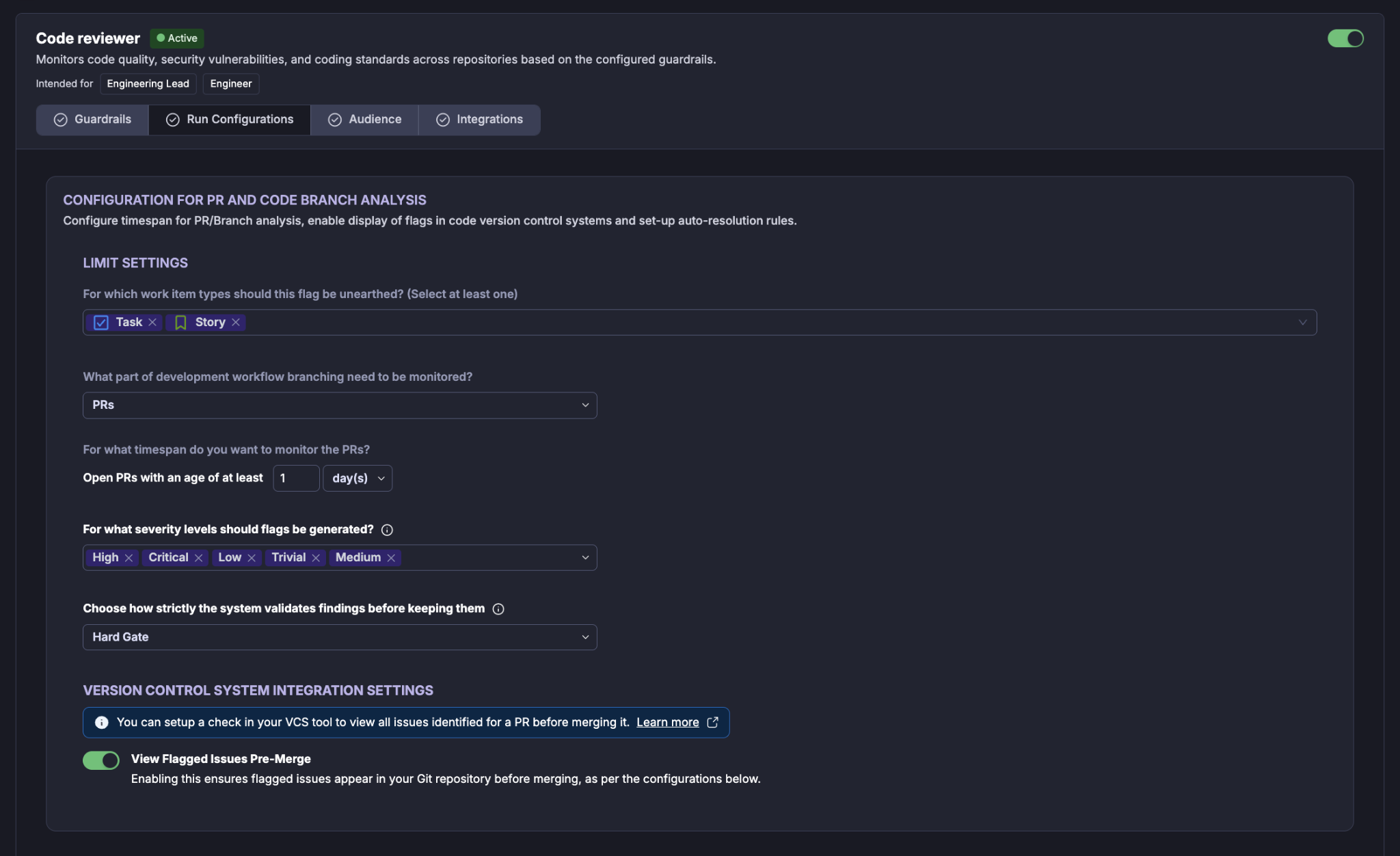
The Run Configurations section controls when the agent runs and how backlog items are evaluated.
Work item types
For which work item types should this flag be unearthed? defines the
planning work-item types associated with the review.
The supplied configuration includes:
Task
Story
Select the work-item types that should be considered when generating the
configured findings.
Development workflow branching
What part of development workflow branching need to be monitored?
determines the type of source-control activity to monitor (e.g. PRs, Branches, Both PRs and Branches).
PR age
For what timespan do you want to monitor the PRs? defines the
minimum age of an open pull request that is considered for analysis.
Severity levels
For what severity levels should flags be generated? controls the
severity levels that can result in findings.
The supplied configuration includes all five visible levels:
High
Critical
Low
Trivial
Medium
This allows findings across the full displayed severity range.
Validation strictness
Choose how strictly the system validates findings before keeping
them controls the validation mode applied to findings.
View Flagged Issues Pre-Merge
View Flagged Issues Pre-Merge controls whether flagged issues are
surfaced in the connected Git repository before a pull request is
merged.
When enabled, the UI states that flagged issues appear in the Git
repository before merging according to the configured settings.
The supplied configuration has this option enabled.
3. Audience
The Audience section determines who receives the results of the agent.
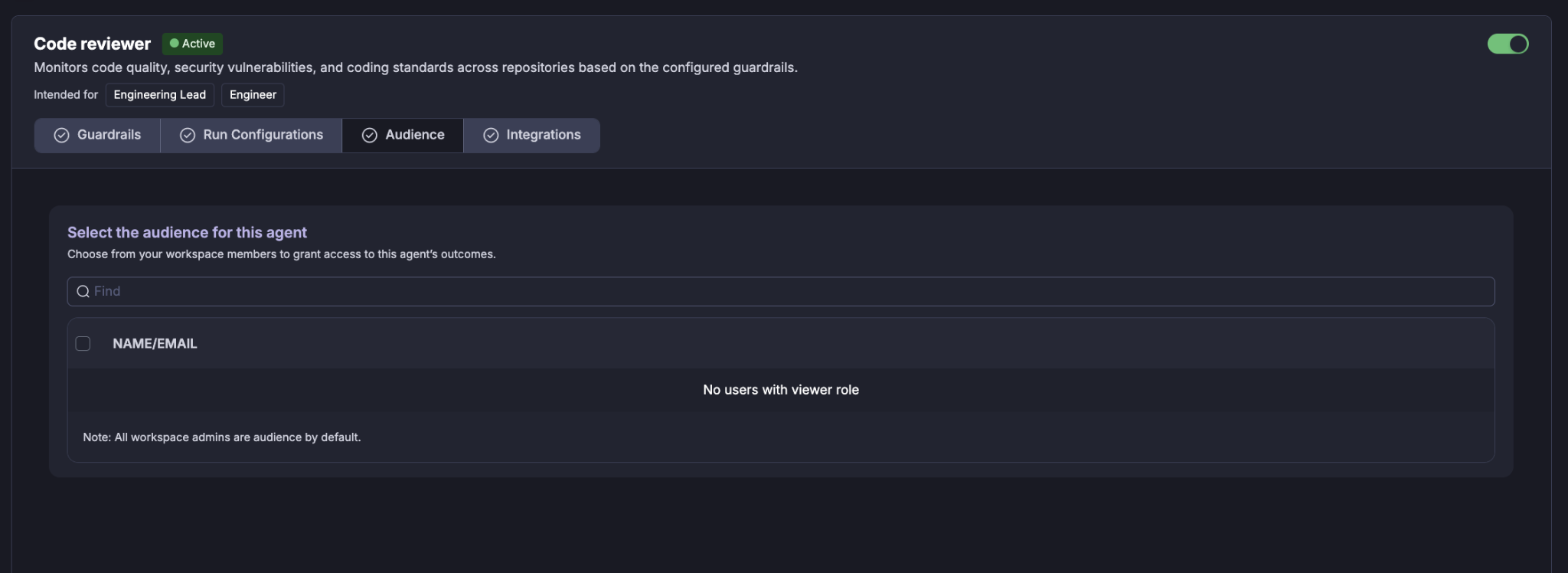
Select the workspace members (Viewers) who should have access to the agent's outcomes. Selected members receive an email after each agent run when email delivery is configured.
Selecting users
Use the Find field to search for a workspace member by name or email. Select the required users using the checkbox next to their name.
Workspace administrators are included as audience members by default.
If there are no users with the required viewer role, the audience list will indicate that no eligible users are available.
3. Integrations
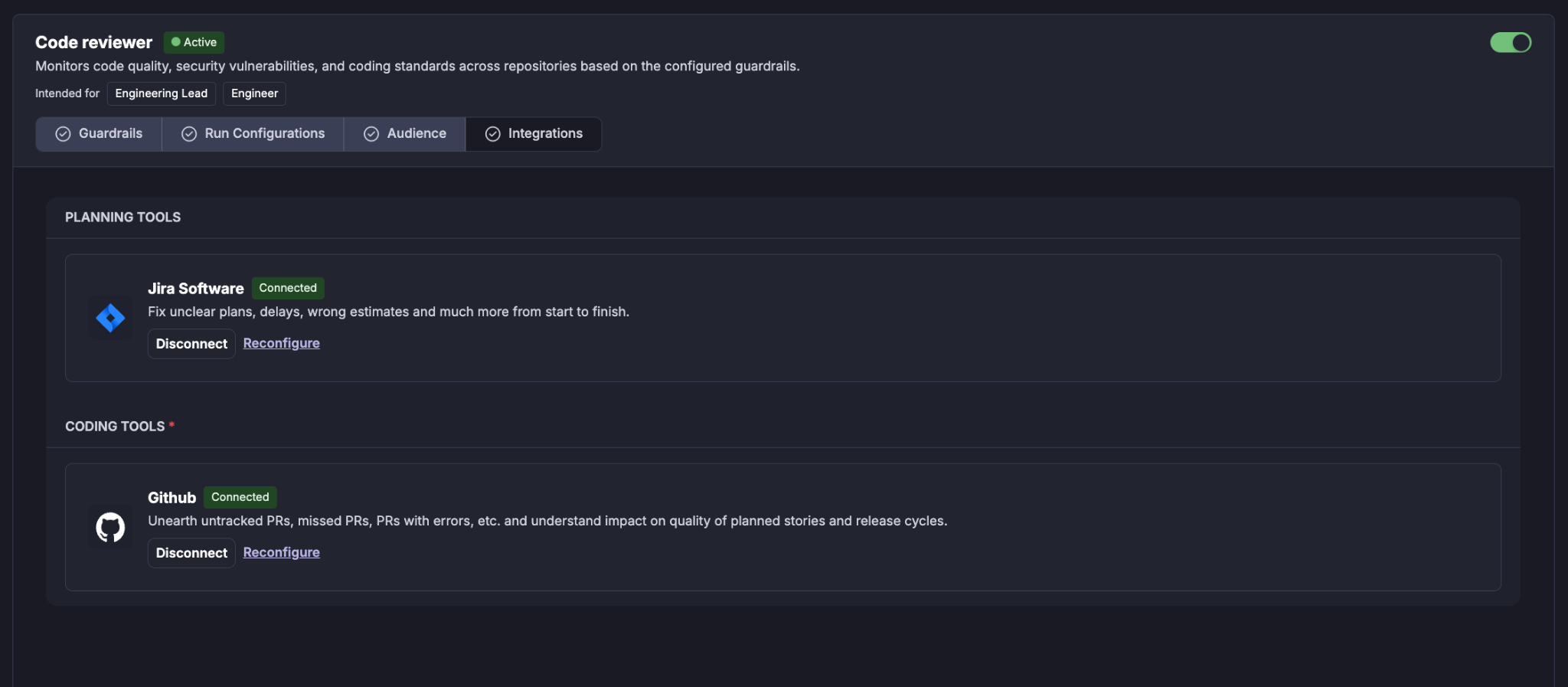
The Integrations section shows the tools required by the agent. The integrations are grouped by purpose.
Planning Tools
For example: Jira Software
The planning integration provides the backlog and planning context required to identify aged work items and determine the next sprint planning date.
A connected integration is shown with a Connected status.
You can:
Disconnect the integration.
Reconfigure the integration.
Coding Tools
For example: Github
GitHub provides the pull requests and repository/code information
required for Code Reviewer analysis.
The UI states that the integration supports identifying items such as
untracked PRs, missed PRs, PRs with errors, and understanding the impact
on the quality of planned stories and release cycles.
Available actions shown in the UI are:
Disconnect
Reconfigure
A connected coding integration is required for PR-based analysis.
Running the Code Reviewer
The agent is run automatically when the developer performs a code commit in his/her branch/PR based on the configuration.
Understanding the Code Review Report
The report provides a consolidated view of the backlog items evaluated for the upcoming planning cycle.
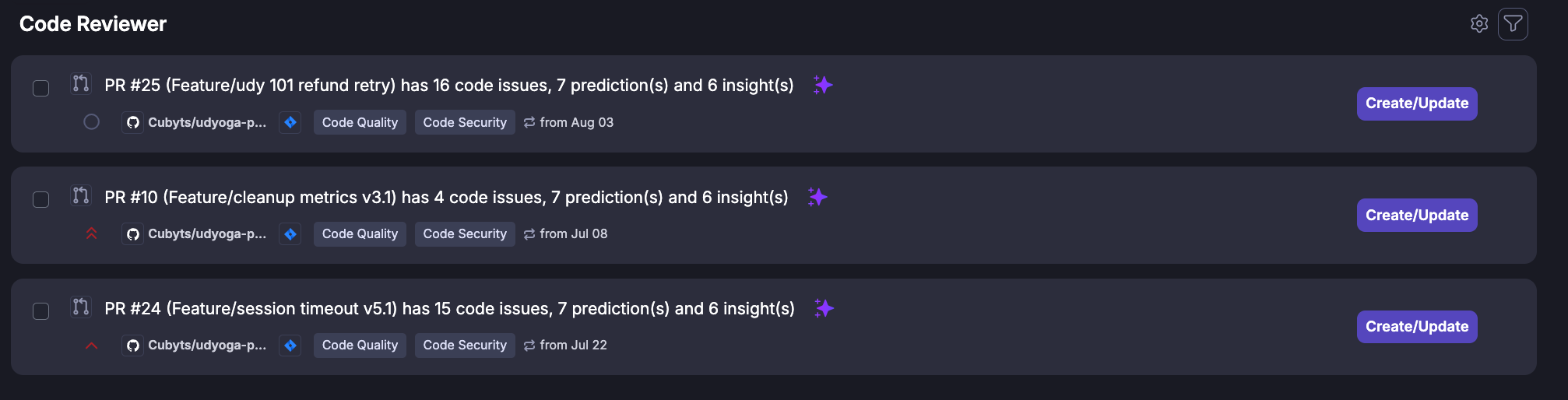
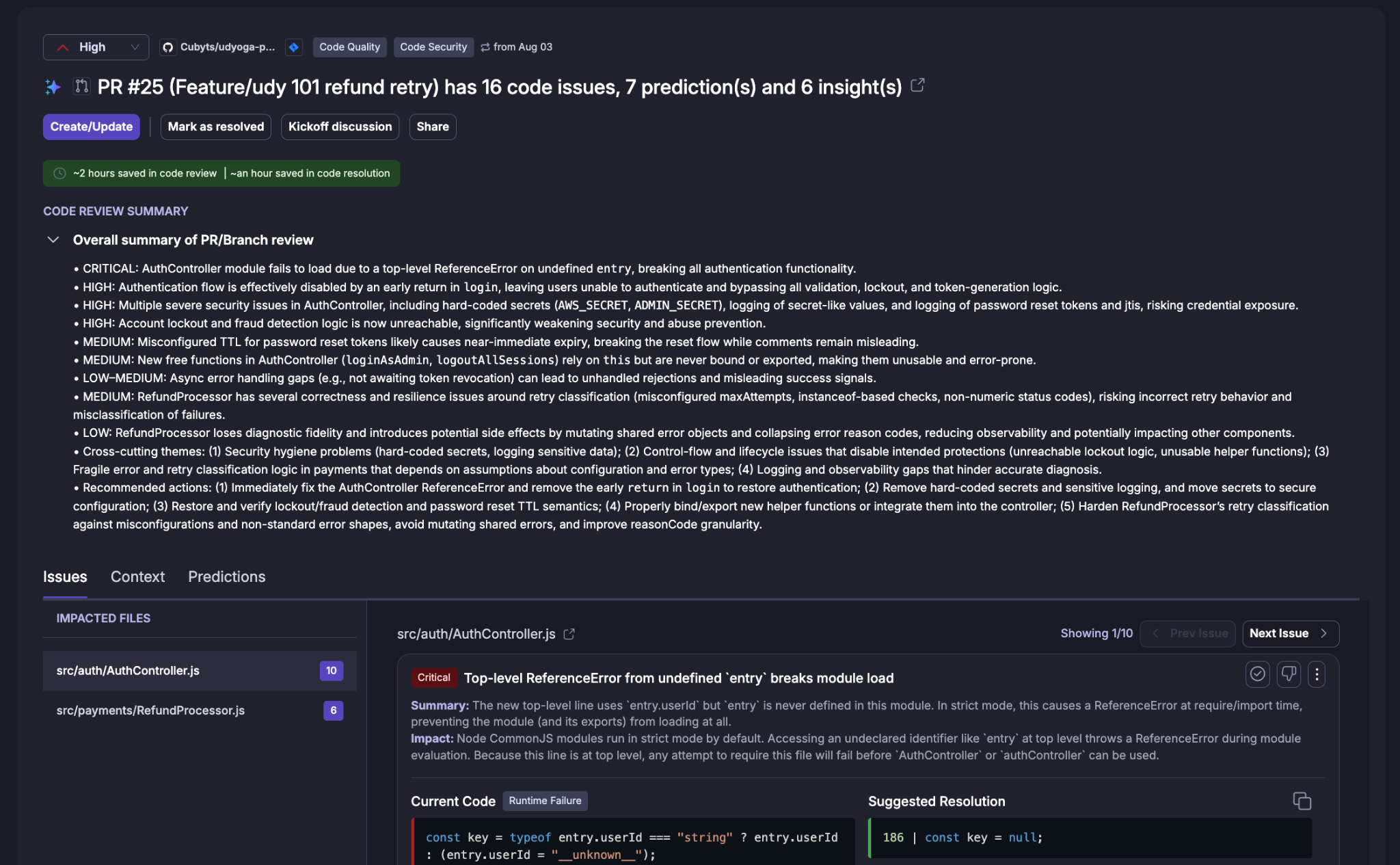
The detailed review provides:
Severity.
Repository and review context.
Pull request title.
Number of code issues.
Number of predictions.
Number of insights.
Review summary.
Issues.
Context.
Predictions.
Developer insights.
Contributing pull requests.
Code Review Summary
The Code Review Summary provides an overall assessment of the pull
request.
The supplied example for PR #25 identifies issues across several
severity levels and groups them into broader themes.
The summary can include:
Critical issues that may prevent a module or feature from
functioning.High-severity security or control-flow issues.
Medium-severity correctness, configuration, or reliability concerns.
Lower-severity maintainability or observability concerns.
Cross-cutting themes identified across multiple findings.
Recommended actions for addressing the most important issues.
For example, the supplied PR #25 summary identifies themes involving:
Security hygiene.
Control-flow and lifecycle issues.
Error and retry classification.
Logging and observability.
Runtime correctness.
The summary is intended to give an engineering lead or engineer a fast
understanding of the overall risk before reviewing individual findings.
Issues
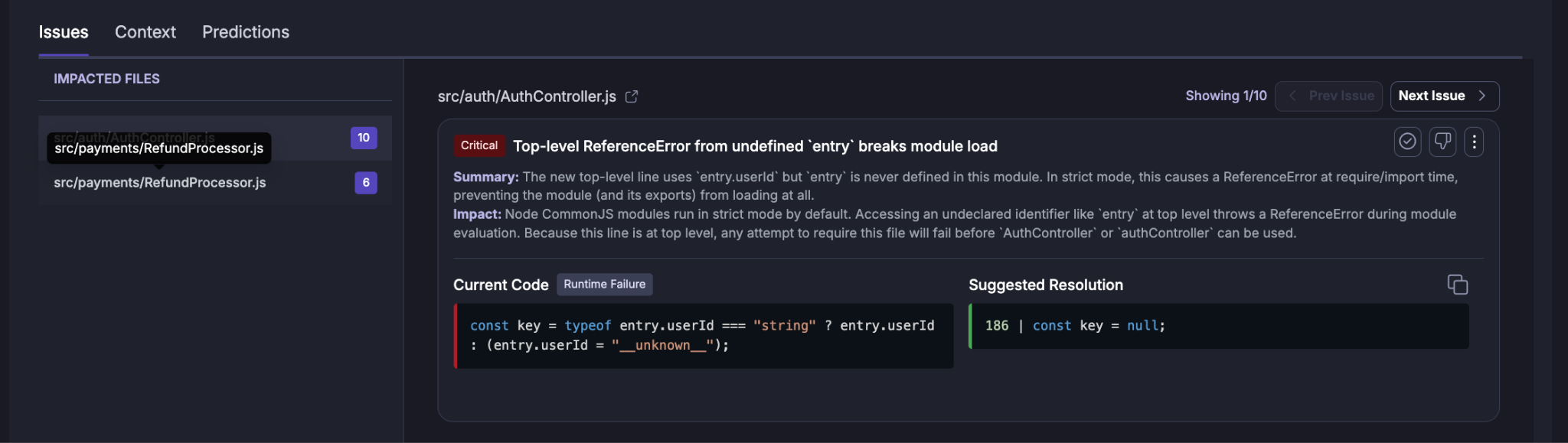
The Issues tab provides the detailed findings generated for the pull
request.
Impacted files
The left side of the Issues view lists files affected by the findings
and shows the number of issues associated with each file.
The supplied example includes:
src/auth/AuthController.js --- 10 issues.
src/payments/RefundProcessor.js --- 6 issues.
Select an impacted file to review the findings associated with it.
Issue details
Each issue can include:
Severity.
Issue title.
Summary.
Impact.
Current code.
Suggested resolution.
The supplied example shows a Critical issue titled:
Top-level ReferenceError from undefined entry breaks module load
The issue explains that an undefined top-level identifier can cause the
module to fail during loading.
Current Code
The Current Code panel shows the code associated with the finding.
This helps the engineer understand the exact implementation pattern that
triggered the finding.
Suggested Resolution
The Suggested Resolution panel provides a recommended change for
addressing the issue.
The recommendation is intended to accelerate remediation while allowing
the engineer to validate the change against the application's design and
requirements.
Navigating issues
Use:
Previous Issue
Next Issue
to move through the findings for the selected file or review.
Context
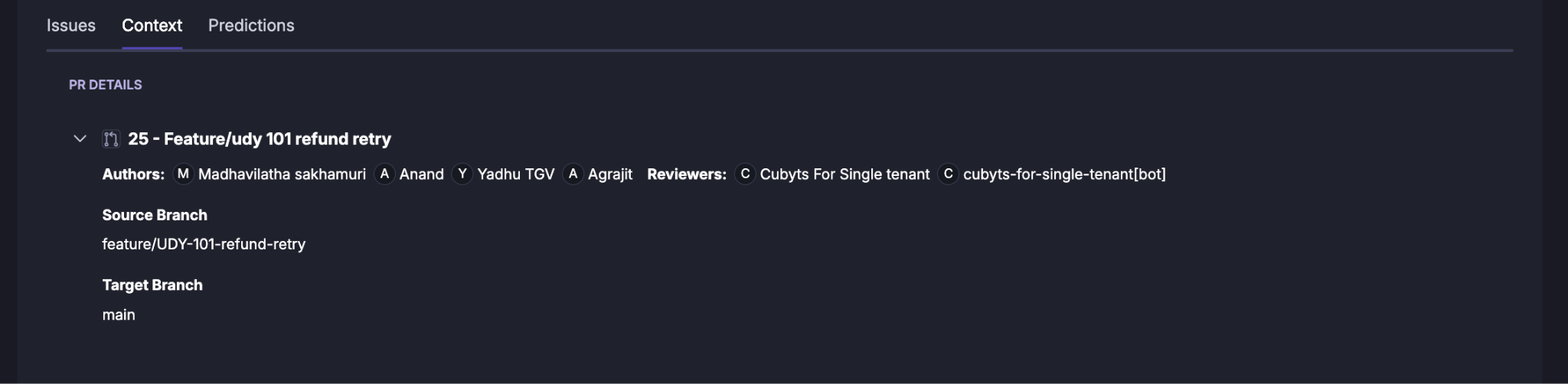
The Context tab provides the pull request information used to
understand the review.
The supplied screen shows a PR Details section containing:
Pull request number and title.
Authors.
Reviewers.
Source branch.
Target branch.
For the supplied example:
PR: 25 --- Feature/udy 101 refund retry
Source branch: feature/UDY-101-refund-retry
Target branch: main
The author and reviewer information provides additional context for the
review and can help engineering leads understand ownership and review
participation.
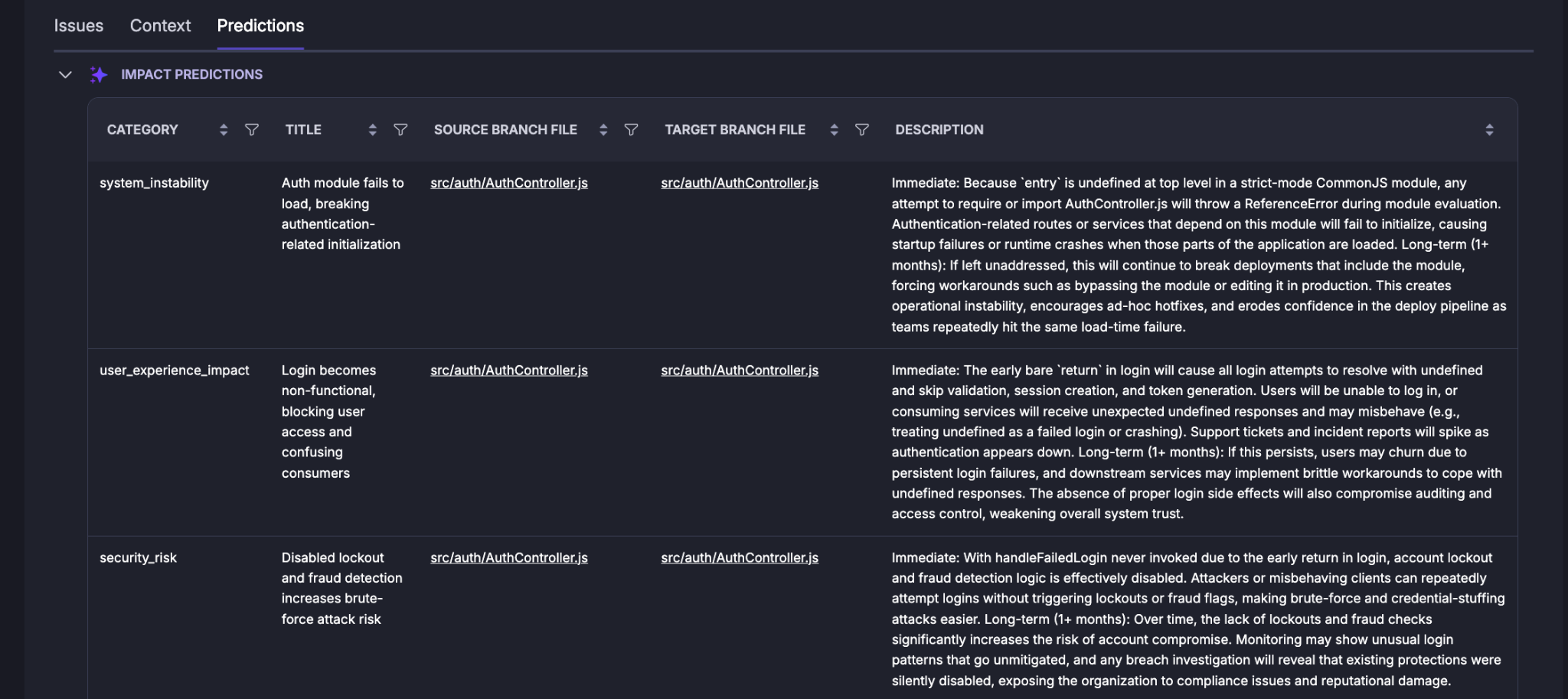
Predictions
The Predictions tab surfaces potential downstream impact inferred
from the code changes.
The supplied screen labels this section:
Impact Predictions
Predictions are presented in a table with fields such as:
Category Type of predicted impact.
Title Short description of the predicted
Impact.Source Branch File File in the source branch
associated with the prediction.Target Branch File Corresponding target-branch file.
The descriptions can distinguish between immediate consequences and
longer-term risks.
For example, a prediction may identify a module-load failure as an
immediate system-instability risk and explain how leaving the issue
unresolved could create operational instability over time.
Predictions should be used as impact signals for engineering review, not
as automatic proof that a predicted outcome will occur.
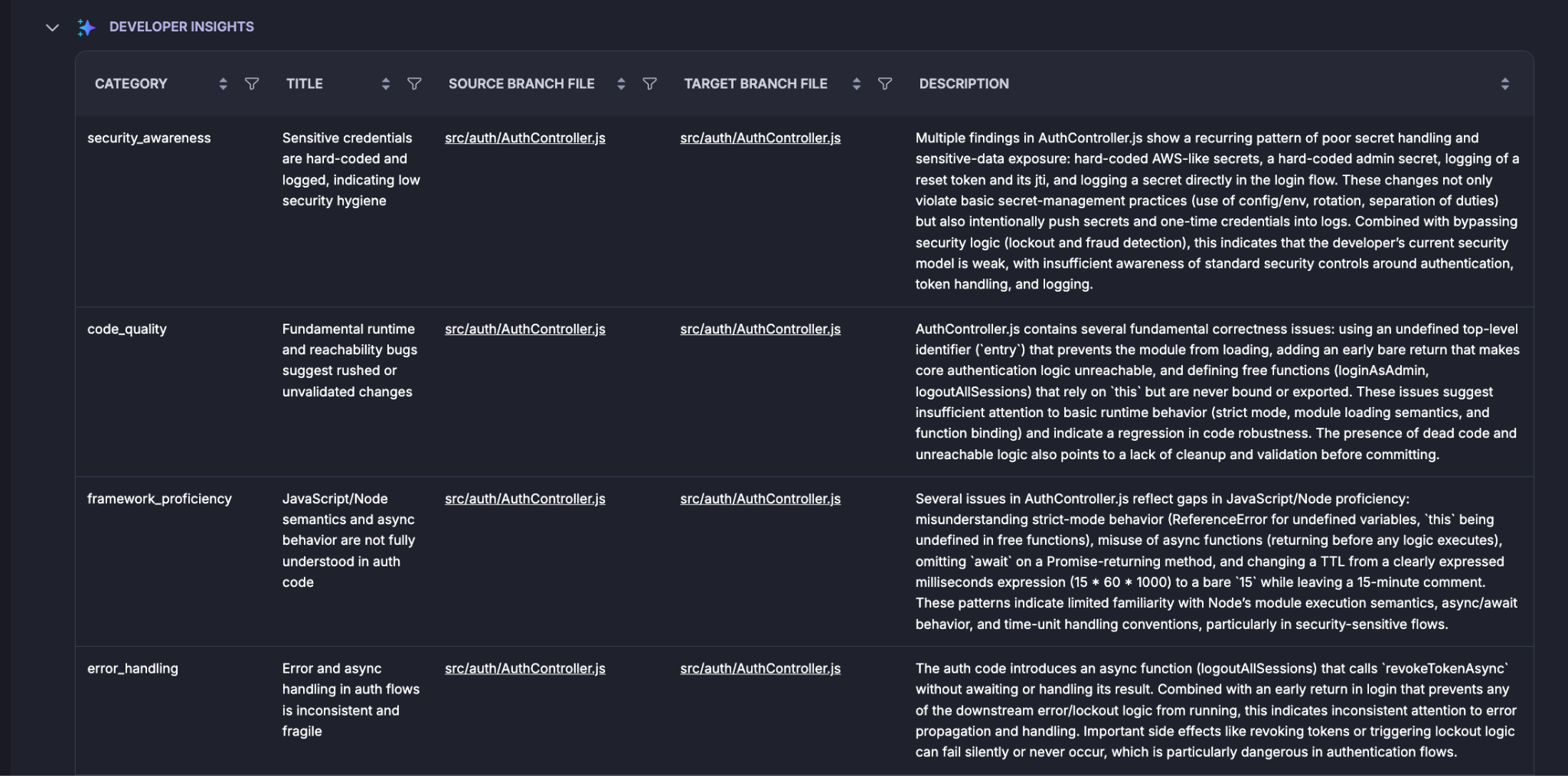
Developer Insights
The Developer Insights section identifies recurring engineering
patterns observed in the reviewed changes.
Category Type of developer or engineering
pattern identified.Title Short description of the insight.
Source Branch File File in the source branch
associated with the insight.Target Branch File Corresponding target-branch file.
The supplied example includes categories such as:
Security awareness: The example identifies recurring patterns such as hard-coded credentials, sensitive-data exposure, and logging of secrets.
Code quality: The example identifies fundamental correctness and runtime issues, such
as undefined identifiers, unreachable logic, and unbound functions.Framework proficiency: The example identifies patterns related to JavaScript/Node semantics, asynchronous behaviour, module execution, and time-unit handling.
Error handling: The example identifies inconsistent or fragile error and asynchronous handling in authentication flows.
Developer Insights are useful for identifying patterns that may benefit
from code review coaching, engineering standards, or targeted training.
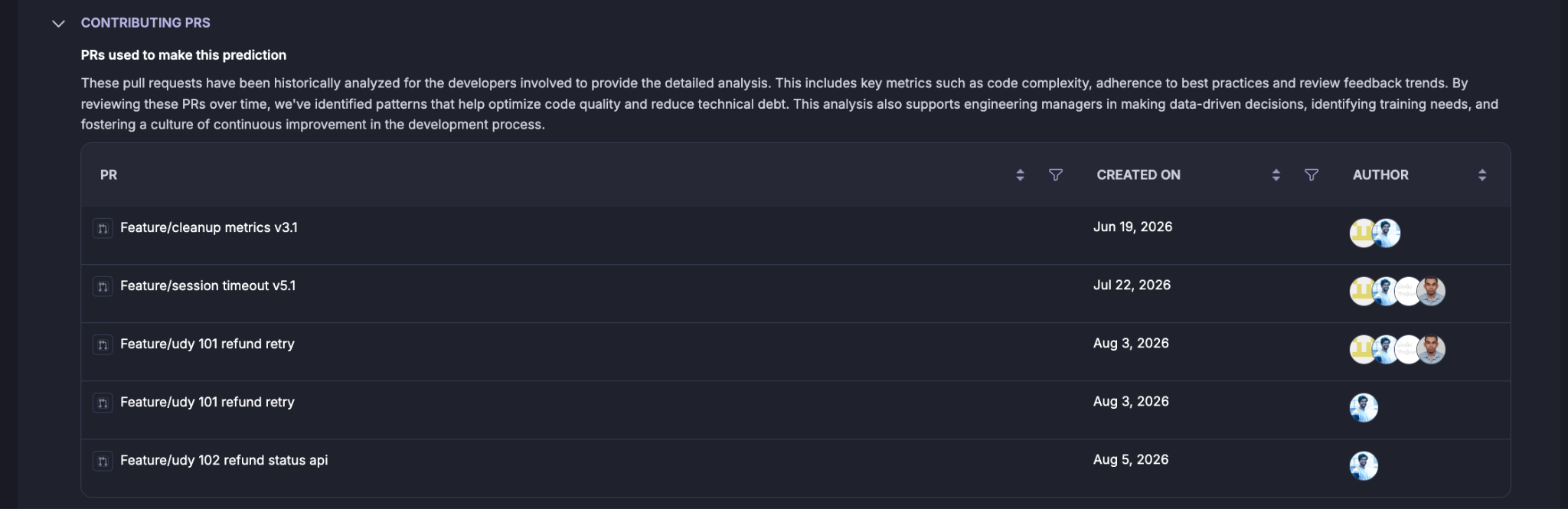
Contributing PRs
The Contributing PRs section shows historical pull requests that
were used to provide additional context for the developer-oriented
analysis.
The supplied screen explains that these pull requests are historically
analysed for the developers involved and can provide signals such as:
Code complexity.
Adherence to best practices.
Review feedback trends.
Code quality patterns.
Technical-debt patterns.
This historical context helps the agent identify recurring patterns
rather than evaluating the current pull request in isolation.
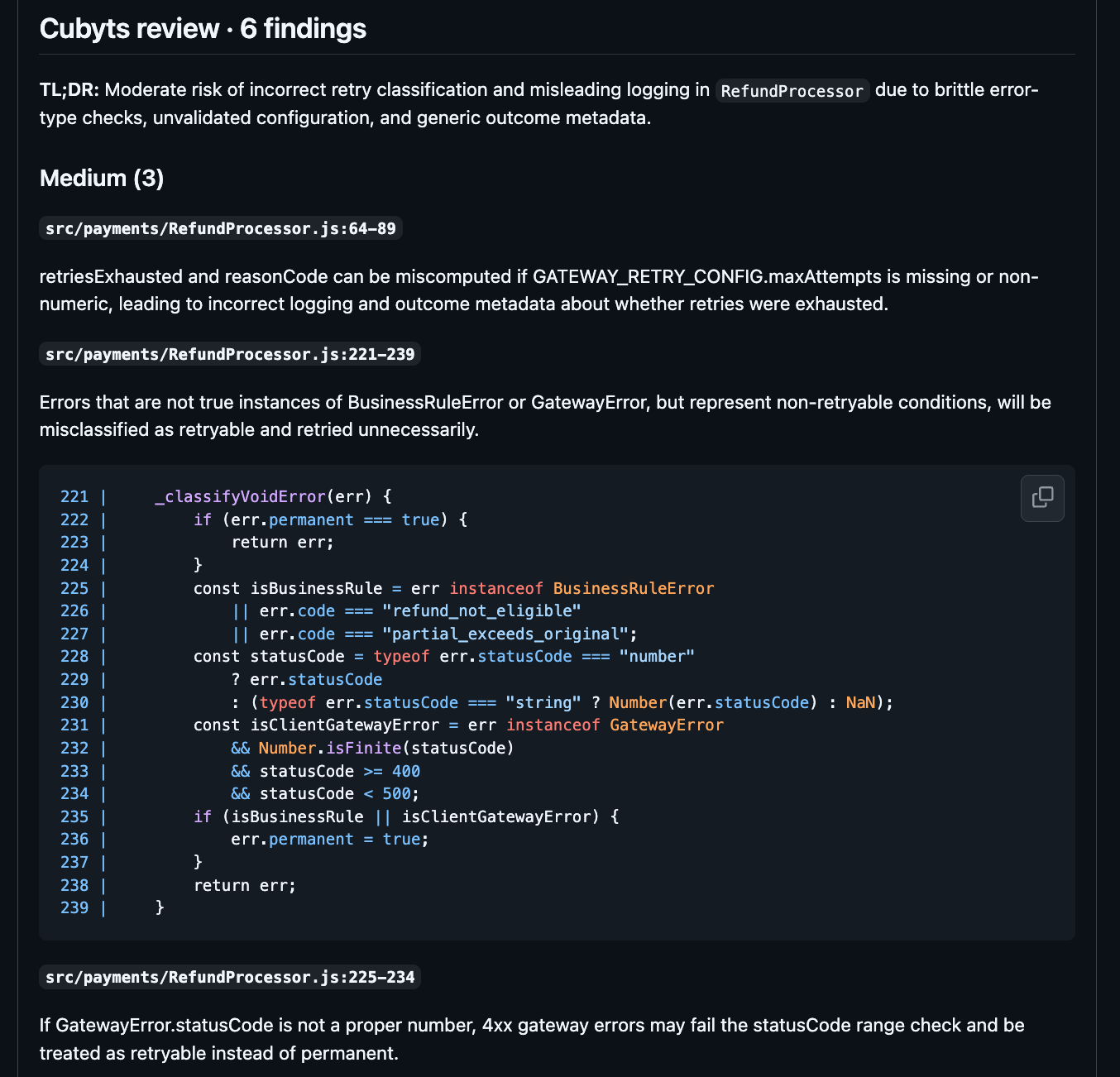
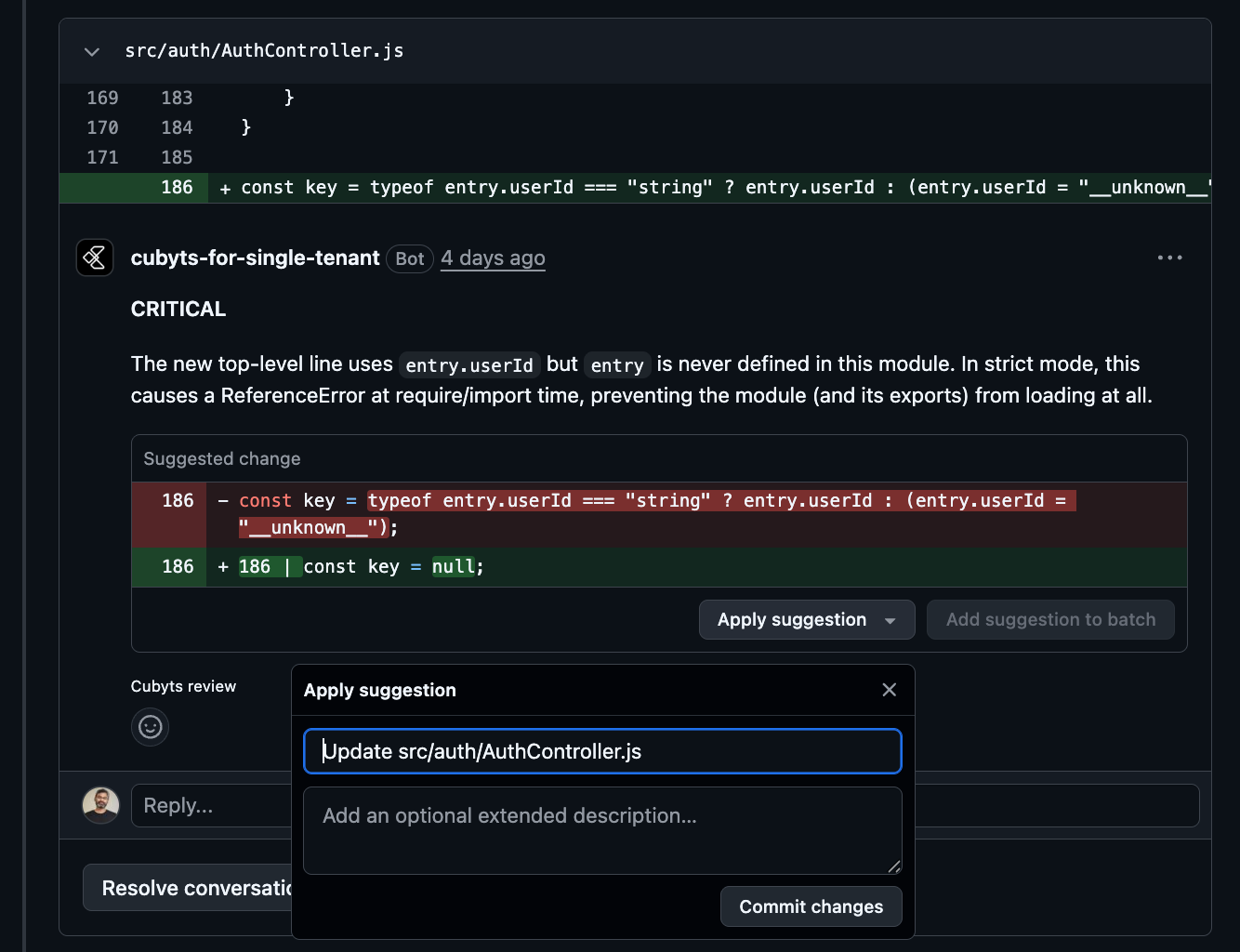
Note: if VERSION CONTROL SYSTEM INTEGRATION SETTINGS is enabled in Run configuration, code reviewer will write the comments in the PR directly, engineer can review the comments and apply the code recommendations directly from git.
A Practical Code Review Workflow
A practical workflow using Code Reviewer is:
Code change → PR analysis → Guardrail findings → Review summary →
Issue remediation → Impact review → Discussion / resolution → Merge
At the beginning of the review:
Review the overall severity and issue count.
Read the Code Review Summary.
Start with Critical and High findings.
Review the impacted files.
Examine the Current Code and Suggested Resolution.
Review Predictions for potential downstream impact.
Review Developer Insights for recurring engineering patterns.
Use Context to understand the PR ownership and branch relationship.
Mark findings as resolved or initiate a discussion as appropriate.
Use the pre-merge integration to surface configured findings in the
Git repository before merge.
Important Boundaries
Code Reviewer is an advisory code-analysis and review agent. It identifies issues, provides suggested resolutions, generates predictions, and provides developer insights. The review output should therefore be treated as decision support for engineers and engineering leads. The agent does not establish that every prediction or suggested resolution is correct in every application context. Engineers remain responsible for validating findings against:
Application requirements.
Architecture and design.
Security policies.
Runtime behaviour.
Repository conventions.
Business context.
A finding should be resolved based on engineering judgement and
appropriate validation rather than solely because it was generated by
the agent.
Summary
Code Reviewer gives Engineering Leads and Engineers a structured
view of code risks across pull requests and code branches.
It combines:
Configurable code quality guardrails
Configurable code security guardrails
PR and branch analysis settings
Severity-based finding controls
Pre-merge visibility
Detailed issue analysis
Impact predictions
Developer insights
Historical contributing PR context
The result is more than a list of code issues. Code Reviewer provides
evidence, context, predicted impact, and suggested remediation so
engineering teams can make more informed decisions before code is
merged.
Was this article helpful?
That’s Great!
Thank you for your feedback
Sorry! We couldn't be helpful
Thank you for your feedback
Feedback sent
We appreciate your effort and will try to fix the article